
How to Test Visual Design in 2026
How to Test Visual Design in 2026
I’ve worked with teams where every test was passing, deployments were smooth, and performance looked solid, but the UI still felt off.
A spacing issue, a broken component state, or a subtle styling regression can damage user confidence instantly. That’s where visual design testing becomes critical.
The real challenge is figuring out how to test it in a structured, repeatable way inside an engineering workflow. How do we verify visual consistency across components? How do we ensure design standards hold up across releases?
In this guide, I’ll break down what visual design testing actually means, how engineers can approach it systematically, and how tools like Percy help operationalize it at scale.
What is Visual Design Testing?
Visual design testing is the process of verifying that a user interface looks exactly as intended across browsers, screen sizes, and releases. From an engineering perspective, it means validating the rendered output of the UI, not just whether the code executes correctly.
 I think of it as the layer that sits on top of functional testing. Functional tests confirm that a button works. Visual design testing confirms that the button looks correct, follows spacing rules, uses the right typography, and aligns properly with surrounding elements.
This type of testing focuses on:
- Layout structure and alignment
- Spacing and component positioning
- Typography and font consistency
- Color usage and visual hierarchy
- Component states such as hover, active, and disabled
Unlike traditional visual regression testing, which often detects any change, visual design testing is more intentional. It checks whether the design system and visual standards are preserved over time.
For engineers, this means translating design expectations into measurable checkpoints. Instead of relying on manual UI review during regression cycles, we create repeatable validations that protect the visual integrity of the product.
Importance of Visual Design Testing
From an engineering standpoint, visual bugs are some of the most expensive development issues to catch late. They rarely break functionality, but they quietly damage usability, trust, and brand consistency. Here’s why I treat visual design testing as a first-class citizen in the pipeline:
- Prevents UI Drift Over Time: As features evolve, small CSS or layout changes accumulate. Visual testing helps me detect unintended shifts before they reach production.
- Protects Design System Consistency: When multiple teams contribute to the same product, inconsistencies creep in. Visual testing ensures components adhere to the shared design language.
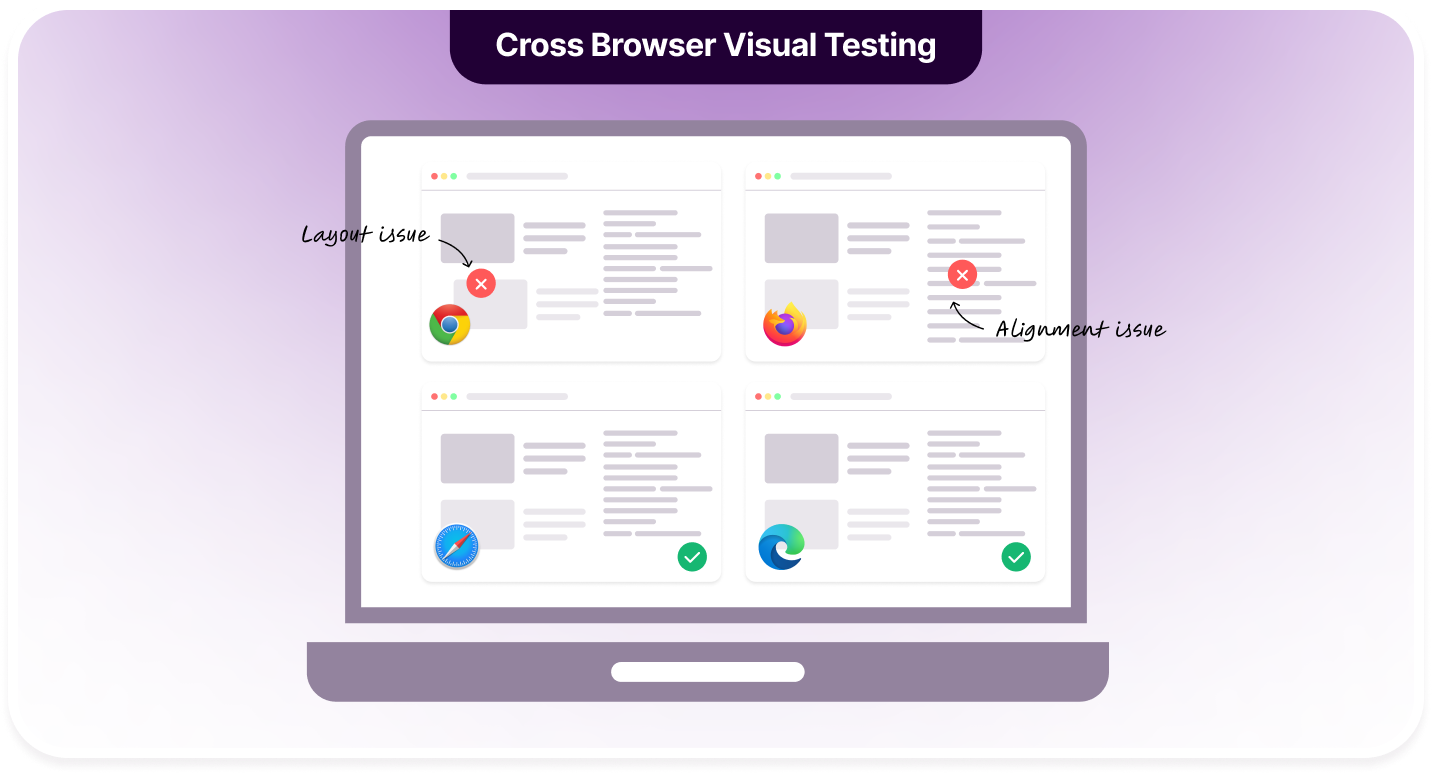
- Catches Cross-Browser Rendering Issues: What looks correct in Edge and Safari might break in Chrome or Firefox. Automated visual testing exposes rendering differences early.
- Reduces Manual QA Dependency: Instead of relying entirely on human visual review during regression cycles, I can automate appearance checks and free QA for exploratory work.
- Improves Release Confidence: When visual diffs are part of CI/CD, I know exactly what changed visually in a build before approving it.
- Prevents Production Hotfixes: Layout breaks, overlapping elements, and hidden buttons are often missed in functional testing. Visual checks catch them before users do.
- Maintains Brand Integrity: Typography, spacing, and color consistency directly influence user perception. Visual testing safeguards those subtle but critical details.
Percy AI Agents enable rapid onboarding, filter out irrelevant visual differences, and accelerate review cycles significantly.
Visual Design Testing Methods
When I approach visual design testing, I usually break it into two buckets:
- What users say about the design
- What users actually do with the design
That distinction matters. Users don’t always behave the way they think they do. So I combine attitudinal testing (opinions and perception) with behavioral testing (real interaction data) to get the full picture.
Attitudinal Testing Methods
Attitudinal methods help me understand how users feel about a design. These are perception-driven and focus on clarity, aesthetics, hierarchy, and emotional response.
1. Expose Users to the Design
This is about capturing first impressions and structured feedback.
- 5-Second Test: I show users the design for five seconds, hide it, and then ask what they remember. This tells me whether the value proposition, CTA, and layout hierarchy are clear.
- First-Click Test: When users try to complete a task, I track where they click first. If their first click is wrong, the visual hierarchy or navigation cues likely need adjustment.
- Preference Testing: I present multiple design variations and ask users which one they prefer. This helps compare layout, color palette, typography, or component styling objectively.
- Asking Targeted Visual Questions: I directly ask users about clarity, color contrast, spacing, typography, and readability. This gives structured qualitative insights.
2. Assess Users’ Reactions
Here, I go deeper into emotional and cognitive perception.
- Open-Ended Preference Explanation: Users explain why they prefer a design. This surfaces reasoning patterns and usability pain points that simple votes don’t reveal.
- Open Word Choice: Users describe the design in their own words. The language they use often highlights brand perception gaps.
- Closed Word Choice: Users select from predefined descriptors like “modern,” “trustworthy,” or “confusing.” This makes feedback easier to categorize and quantify.
- Numerical Rating Scale: I ask users to rate clarity, aesthetics, usability, and trust on a scale (e.g., 1–10). This converts perception into measurable data I can compare across iterations.
Behavioral Testing Methods
Here, instead of asking users what they think, I observe what they actually do.
- Eye-Tracking: Using specialized tools, I analyze where users look first, how long they focus on elements, and whether CTAs draw attention. This helps validate visual hierarchy.
- A/B Testing: I release two design variations to different user groups and measure performance metrics like clicks, engagement, or conversions. The better-performing version wins based on real behavior, not opinion.
How to Select Components in Visual Testing
When I test visual design, I don’t try to snapshot everything blindly. That creates noise. Instead, I deliberately choose components that are visually sensitive, high-impact, or prone to regression.
Here’s how I approach component selection:
- High-Visibility UI Elements: Components such as headers, navigation bars, hero sections, and primary CTAs should be prioritized. These elements shape first impressions and directly influence user trust.
- Reusable Design System Components: Buttons, cards, modals, form fields, and dropdowns often appear across multiple screens. A visual regression in one reusable component can affect the entire product.
- Layout-Critical Sections: Grid systems, containers, and alignment-heavy components require attention. Even minor spacing or alignment shifts can disrupt the overall structure.
- Multiple Component States: Default states alone are not sufficient. Hover, focus, disabled, loading, and error states should also be included to ensure consistent behavior.
- Dynamic Content Areas: Components that render API-driven or user-generated content may experience overflow, truncation, or wrapping issues. These areas are particularly sensitive to layout regressions.
- Responsive Breakpoints: Components that adapt across mobile, tablet, and desktop views should be tested at different screen sizes to maintain visual consistency.
- Brand-Defining Elements: Typography scales, color systems, spacing standards, and visual hierarchy contribute to brand identity and must remain stable.
- Recently Updated Components: Any recently modified UI component carries a higher regression risk and should be included in visual validation cycles.
- High-Impact User Journeys: Components involved in critical flows such as sign-up, checkout, or onboarding deserve special attention due to their business impact.
How to Test Visual Design Using Percy
Visual design testing with BrowserStack Percy combines automation with intelligent visual comparison. Below is a practical, step-by-step workflow to integrate Percy into a typical UI test setup.
Step 1: Install Percy in Your Project
First, install the required Percy packages (example shown with Selenium + Node.js):
npm install --save-dev @percy/cli @percy/selenium-webdriverIf you are using Python:
pip install percy-seleniumStep 2: Set Your Percy Token

Export your Percy token as an environment variable:
export PERCY_TOKEN=your_project_token(On Windows PowerShell:)
setx PERCY_TOKEN "your_project_token"Step 3: Add Percy Snapshot to Your Selenium Test
Here’s an example using Selenium WebDriver (Node.js):
const { Builder, By } = require('selenium-webdriver');
const percySnapshot = require('@percy/selenium-webdriver');

(async function visualTest() {
  let driver = await new Builder().forBrowser('chrome').build();

  try {
    await driver.get('https://example.com');

    // Capture full-page visual snapshot
    await percySnapshot(driver, 'Homepage - Desktop');

  } finally {
    await driver.quit();
  }
})();
This snapshot becomes the visual baseline during the first run.
Step 4: Run Tests with Percy CLI
Execute your tests through Percy:
npx percy exec -- node your-test-file.jsPercy captures the DOM, assets, and styles, then renders snapshots in a consistent environment for comparison.
Step 5: Review Visual Differences

After execution:
- Percy compares new screenshots against the baseline.
- Differences are highlighted automatically.
- Review UI changes in Percy’s dashboard.
- Approve expected changes or flag unintended regressions.
Step 6: Test Specific Components (Optional)
To focus on a particular UI component:
await percySnapshot(driver, 'Signup Modal', {
  widths: [375, 768, 1280],
  minHeight: 800
});
This allows responsive validation across multiple screen widths.
Step 7: Integrate with CI/CD
Add Percy execution into your CI pipeline:
npx percy exec -- npm run testThis ensures every pull request is visually reviewed before merging.
By combining automated Selenium flows with Percy’s visual engine, teams can systematically detect layout shifts, typography changes, spacing inconsistencies, and styling regressions before they reach production.
Why Choose Percy For Visual Design Testing?
Modern visual design testing demands more than simple pixel comparison. Teams need intelligent diffing, cross-browser rendering consistency, scalable review workflows, and seamless CI integration. Percy addresses these needs by combining automation, AI visual testing, and cloud-based rendering into a unified workflow.
Below is a breakdown of Percy’s key capabilities and their practical impact:
| Feature | Description | Impact on Users |
|---|---|---|
| Visual AI Engine | Uses intelligent diffing to distinguish meaningful UI changes from rendering noise. It focuses on layout, structure, and styling changes rather than raw pixel shifts. | Reduces false positives and minimizes review fatigue, allowing teams to focus only on real design regressions. |
| Automated Snapshot Capture | Integrates with Selenium, Cypress, Playwright, and other frameworks to capture UI states automatically during test execution. | Eliminates manual screenshot processes and embeds visual checks directly into existing test suites. |
| Cross-Browser Rendering | Renders snapshots across multiple browsers and configurations in a consistent cloud environment. | Ensures UI consistency across Chrome, Firefox, and other browsers without maintaining local infrastructure. |
| Responsive Width Testing | Captures layouts at multiple screen widths within a single build. | Confirms responsive design integrity across desktop, tablet, and mobile breakpoints. |
| Parallelized Builds | Processes snapshots concurrently in the cloud for faster feedback. | Speeds up CI pipelines and reduces overall test execution time. |
| Baseline Management | Maintains versioned baselines and allows controlled approval of UI changes. | Prevents accidental design drift and creates a clear visual history across releases. |
| Pull Request Integration | Adds visual diffs directly to pull requests for review. | Enables developers and designers to collaborate visually before code is merged. |
| Smart Diff Highlighting | Highlights precise areas of change with side-by-side and overlay comparisons. | Simplifies visual inspection and accelerates decision-making during code review. |
| Scalable Infrastructure | Runs entirely in the cloud without requiring teams to manage browser grids or rendering servers. | Reduces maintenance overhead while supporting growing test coverage and team size. |
Percy Offers 50+ Integrations

Visual Design Testing: Trends And Best Practices
Visual design testing continues to evolve as products grow more component-driven and release cycles become faster. Below are the key trends and practical best practices shaping how teams approach it today:
- Shift-Left Visual Validation: Teams increasingly introduce visual checks during development rather than waiting for QA cycles. Catching design drift early reduces rework and prevents late-stage surprises.
- Component Testing Over Full-Page Testing: Instead of validating entire pages repeatedly, teams focus on reusable UI components. This improves coverage while keeping test suites lean and maintainable.
- Design System Enforcement Through Automation: Visual tests are being used to enforce spacing, typography, and color standards defined in design systems. This reduces inconsistency across teams and micro-frontends.
- CI/CD-Native Visual Testing: Visual checks are integrated directly into pull requests and pipelines. Automated feedback allows developers to review UI changes before merging.
- Reduced Pixel-Perfect Dependency: Modern automated visual testing tools rely less on strict pixel matching and more on intelligent diffing. This approach reduces noise caused by anti-aliasing, rendering differences, or minor environment shifts.
- Responsive and Multi-Viewport Testing: Products are no longer validated at a single resolution. Testing across breakpoints is becoming standard practice rather than an afterthought.
- Collaboration Between Design and Engineering: Designers are increasingly involved in reviewing visual diffs. Shared visibility strengthens alignment between implementation and design intent.
- Controlled Baseline Updates: Teams treat baseline updates as deliberate decisions, not automatic resets. This protects visual consistency across long-term releases.
- Focus on High-Risk UI Areas: Critical flows such as onboarding, checkout, and dashboards receive prioritized visual coverage to safeguard business impact.
Adopting these practices helps teams move beyond ad-hoc screenshot comparisons and toward a structured, scalable visual quality strategy.
Good visual design guarantees user interaction. Perfect your UI quality with Percy’s advanced visual diff and cross-browser testing.
Conclusion
Visual design testing bridges the gap between functional correctness and real user perception. A product can pass every functional test and still fail visually through spacing issues, broken hierarchy, or inconsistent components.
A structured approach that combines attitudinal insights, behavioral data, and automated visual regression gives teams stronger control over UI quality. When integrated into CI workflows using tools like Percy, visual validation becomes continuous rather than reactive.
Ultimately, visual quality should not rely on manual review alone. Treating design integrity as a testable, repeatable engineering concern leads to more consistent releases and stronger user trust.
Related Articles

What is Visual Testing in Software Testing?
Visual testing in software testing explained. Benefits, tools, best practices, and how to implement ...

Top 12 Screenshot Testing Tools in 2026
Learn how screenshot testing works and compare 12 screenshot testing tools to prevent visual regress...

Visual QA Testing: Tools, Benefits, and Best Practices for 2026
Learn what visual QA testing is, why it matters, and explore the best visual QA tools for 2026, incl...