
Top 20 Visual Testing Tools for 2026

Top 20 Visual Testing Tools for 2026
Visual testing tools have become essential for modern UI quality, yet many teams still struggle to trust their results. Despite widespread adoption, visual testing often breaks down under real-world conditions.
Tests are flaky, reviews are noisy, and teams end up spending more time managing screenshots than catching meaningful regressions. So why does visual testing still feel harder than it should? The problem usually isn’t the practice itself, but the tools.
This article covers the top 20 visual testing tools for 2026, what problems each tool solves, and how teams can choose the right one.
What are Visual Testing Tools?
Visual testing tools are software solutions that automatically check how a user interface looks after each code change. They capture screenshots of pages or components and compare them against approved baselines to detect visual issues.
30% of Users Leave Because of Visual Bugs. Use Percy to protect your user conversions.
Unlike manual review or functional tests, visual testing tools scale visual validation across browsers, devices, and screen sizes. They help teams catch visual regressions early, reduce repetitive UI checks, and ensure the interface users see matches design expectations before changes reach production.
20 Best Visual Testing Tools for 2026
While there are many visual testing tools you can equip for 2026, we’ve handpicked 20 tools based on the accuracy of visual diffing, support for dynamic content, and ease of CI and automation integration. We’ve also considered collaboration and review workflows, cross-browser and device coverage, and how well each tool fits into real testing pipelines.
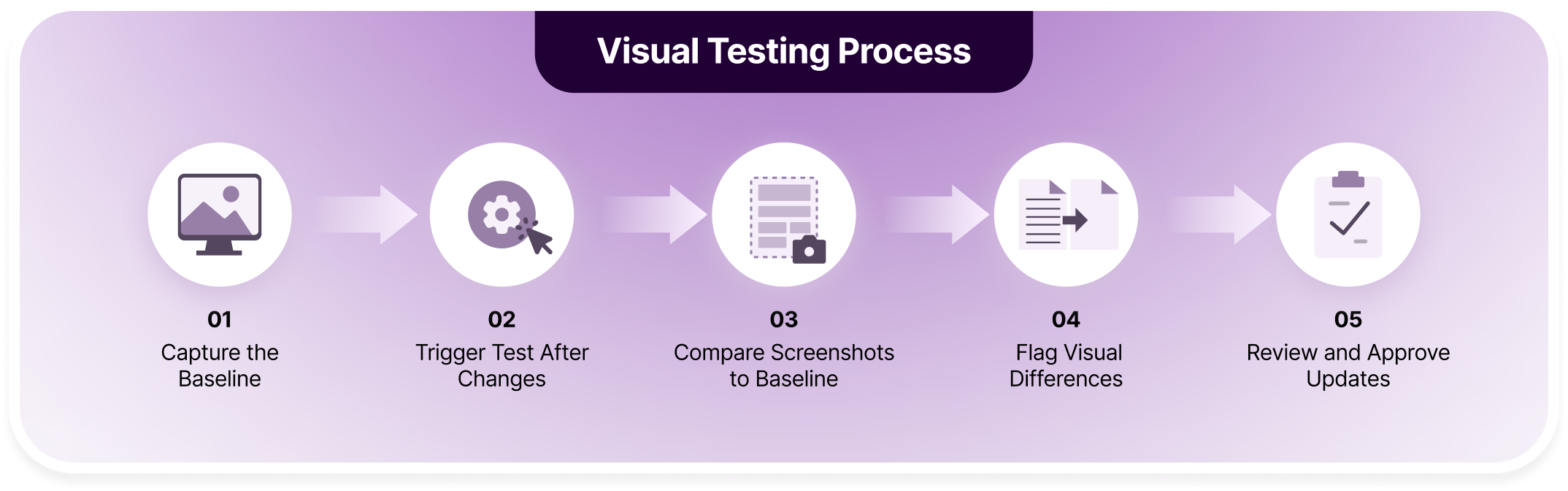
20 Best Visual Testing Tools for 2026 Percy by BrowserStack is an AI‑powered visual UI testing platform that automates UI comparisons and highlights meaningful visual changes before they reach users. Percy helps teams catch layout shifts, dynamic content issues, and breakages across browsers and devices with minimal noise and manual effort. Percy is ideal for teams that: Key Features and Impact of Percy: How You Can Leverage Percy’s AI Integrations For Visual Testing: Pricing: Percy offers a free plan with 5,000 screenshots per month and scalable plans for broader coverage. Verdict: Percy unlocks enhanced visual automation capabilities for small and large teams to consolidate reviews at once and fastrack release cycles. Applitools Eyes targets visual validation using image comparison combined with layout-based analysis. It is often used by teams that want control over how visual differences are detected and reviewed. The tool supports a wide range of browsers and devices and integrates with many automation frameworks. Key features of Applitools Eyes include: Limitations of using Applitools Eyes: Pricing: $969 per month, with higher enterprise packages. Verdict: Fits teams that need visual comparison controls; but does not fit teams that need advanced visual accuracy with real device infrastructure, device-specific testing, or wider integration options to your existing testing framework. Selenium is a widely adopted browser automation framework that can be extended for visual testing through screenshot comparison. Teams typically use it as a foundation for custom visual regression setups rather than a dedicated visual testing solution. Key features of Selenium include: Limitations of using Selenium: Pricing: Open-source and free; infrastructure costs vary. Verdict: Works as a base for custom visual testing, but not suitable for teams seeking out-of-the-box visual validation or scalable visual workflows. BackstopJS is an open-source visual regression testing tool commonly used for front-end projects. It relies on headless browsers to capture screenshots and compare them against baseline images. BackstopJS allows for full control over configuration and infrastructure. Key features of BackstopJS include: Limitations of using BackstopJS: Pricing: BackstopJS is a free, open-source platform, and it can be installed via NPM. Verdict: Fits teams comfortable with open‑source command‑line tools and custom baselines; does not fit teams that need extensive device coverage and built-in reporting. Playwright is a modern browser automation framework that includes built-in screenshot and snapshot capabilities. It is often used for lightweight visual checks during end-to-end testing. Key features of Playwright include: Limitations of using Playwright: Pricing: Open-source and free. Verdict: Suitable for basic visual assertions, but insufficient for teams needing robust visual regression management at scale. Puppeteer provides headless browser control primarily for Chromium-based testing. Visual testing is achieved through manual screenshot comparison rather than specialized visual validation. Key features of Puppeteer include: Limitations of using Puppeteer: Pricing: Open-source and free. Verdict: Useful for targeted visual checks in Chromium, but not viable for cross-browser or production-grade visual testing. Cypress is an end-to-end testing framework focused on developer productivity. Visual testing support relies on screenshots and third-party integrations. Key features of Cypress include: Limitations of using Cypress: Pricing: Open-source core; paid dashboard plans available. Verdict: Good for developer-centric visual checks, but not designed for comprehensive visual regression testing. Chromatic is built for teams using Storybook and component-driven development. It prioritizes validating UI components in isolation rather than full application flows. Visual changes are tracked at the component level, which helps teams maintain design consistency. Key features of Chromatic include: Limitations of using Chromatic: Pricing: Starter package at $179/month and pro package at $399/month Verdict: Fits front‑end teams using Storybook and component libraries; does not fit teams without isolated component workflows or full‑page visual testing needs. Testplane (formerly known as Hermione.js) is an open‑source visual regression tool built on WebDriver that supports parallel execution and flexible environment configurations. It is designed to speed up visual regressions in JavaScript test suites. Key features of Testplane include: Limitations of using Testplane: Pricing: Free, open-source platform that requires BrowserStack Percy as add-on to equip real device infrastructure. Verdict: Fits JavaScript teams with existing WebDriver infrastructure; does not fit teams seeking out‑of‑the‑box dashboards and minimal setup. Catch Visual Regressions 3x Faster Using Percy Storybook is a component development environment commonly paired with visual testing tools to validate UI components in isolation. Key features of Storybook include: Limitations of using Storybook: Pricing: Open-source; paid addons available. Verdict: Excellent visual testing foundation for components, but requires external tools for actual visual validation. Needle is a lightweight Python‑based visual regression tool that integrates with Selenium to compare screenshots against baselines. It is often chosen for simple regression checks without heavy frameworks. Key features of Needle include: Limitations of using Needle: Pricing: Completely free and open-source, often used with Selenium and nose. Verdict: Fits Python teams needing simple visual validation; does not fit teams requiring expansive cross‑browser and multi‑device testing. Argos is a visual regression testing tool built around screenshot comparison for web applications, often used with CI pipelines. Key features of Argos include: Limitations of using Argos: Pricing: Free tier available; paid plans for higher usage. Verdict: Good for lightweight visual regression, but limited for enterprise or cross-platform needs. Aye Spy is an open‑source visual comparison tool focused on performance, enabling rapid regression checks with high‑speed comparisons. It tackles large screenshot sets efficiently using configurable thresholds. Key features of Aye Spy include: Limitations of using Aye Spy: Pricing: Self-hosted free tool, but requires additional setup costs for infrastructure and cloud storage. Verdict: Fits performance‑focused teams and open‑source advocates; does not fit teams needing comprehensive dashboards and builtin collaboration features. Vizregress is a visual regression testing tool built around screenshot comparison and Git-based workflows. It focuses on helping teams catch unintended UI changes early by comparing visual snapshots across builds without adding heavy infrastructure or complex setup. Key features of Vizregress include: Limitations of using Vizregress: Pricing: Free tool Verdict: Fits teams that want simple visual regression checks closely tied to Git workflows; does not fit teams that need large-scale cross-browser, cross-device visual coverage or advanced review workflows. Testlio is a managed testing service that includes visual testing through human and hybrid approaches rather than pure automation. Key features of Testlio include: Limitations of using Testlio: Pricing: Enterprise-only, custom pricing. Verdict: Fits teams needing human visual validation at scale, but not teams seeking automated visual regression testing. Appium is a cross-platform mobile automation framework that enables screenshot-based visual testing on mobile apps. Key features of Appium include: Limitations of using Appium: Pricing: Open-source and free; device infrastructure costs apply. Verdict: Necessary for mobile automation, but insufficient as a standalone visual testing solution. Galen Framework is a layout testing tool that specializes in responsive design validation using a simple specification language. It focuses on layout rules and responsive behavior across screen sizes. Key features of Galen Framework include: Limitations of using Galen Framework: Pricing: Free, open-source tool distributed under Apache License. Verdict: Fits teams prioritizing responsive layout checks and grid consistency; does not fit teams that need pixel‑perfect visual regression comparisons. Wraith is an open-source visual regression testing tool that compares screenshots across environments. It is typically used for static or layout-focused visual checks. Key features of Wraith include: Limitations of using Wraith: Pricing: Open-source and free. Verdict: Useful for basic visual regression, but outdated for modern CI-driven UI testing needs. Visual Regression Tracker is a self‑hosted baseline tracking tool that lets teams compare screenshots over time while keeping data under their control. It provides a dashboard for managing visual baselines and reviewing decisions. Key features of Visual Regression Tracker include: Limitations of using Visual Regression Tracker: Pricing: Free platform, but requires additional infrastructure using tools like Percy Verdict: Fits teams that require self‑hosting and full data control; does not fit teams that want a managed SaaS solution with minimal infrastructure responsibilities. Catch Visual Bugs 40% Faster With Visual Automation TestGrid is a cloud-based testing platform that includes visual testing as part of a broader test automation offering. Key features of TestGrid include: Limitations of using TestGrid: Pricing: Custom pricing based on usage. Verdict: Suitable for teams wanting an all-in-one testing platform, but not ideal for visual testing–focused teams. Visual testing tools automate the process of checking how a UI renders after every code change. Each step ensures that visual changes are tracked, reviewed, and validated before reaching users. These steps typically run across multiple browsers and viewports inside CI pipelines, giving teams fast, reliable feedback on visual changes without manual rechecks. Here is a step-by-step process of how it works: Step 1: Capture the Baseline: Screenshots of pages or components are taken in their expected state across defined browsers and viewports. These images become the visual reference for future comparisons. Step 2: Trigger Tests After Changes: Visual checks run automatically whenever code is updated or a pull request is opened. This ensures every UI change is evaluated before it reaches production. Step 3: Compare Screenshots to Baseline: New screenshots are compared with approved baselines to detect differences in layout, spacing, styling, or missing elements across environments. Step 4: Flag Visual Differences: Tools suppress noise from dynamic content like animations or timestamps and surface only meaningful visual changes. This keeps reviews focused and reliable. Step 5: Review and Approve Updates: Reviewers inspect side-by-side diffs to approve intentional changes or flag defects. Approved updates refresh the baseline, keeping visual tests accurate as the UI evolves. When evaluating visual testing tools, teams should look at the following criteria. These factors determine whether visual testing becomes a safety net or another maintenance burden: Visual testing tools help teams improve user experience by catching visual bugs early in the development cycle. It also expands test coverage across browsers and devices, supporting faster and more reliable releases. Below are the key benefits teams see once visual coverage is in place: As applications grow more complex and release cycles shorten, teams need a reliable way to catch visual regressions that functional tests cannot detect. The right tool helps reduce manual review effort, improve cross-browser consistency, and give teams confidence that visual changes are intentional. Among the tools covered, Percy stands out for teams that need accurate visual feedback without added noise or workflow friction. Its ability to scale across browsers, support both pages and components, and fit directly into existing test pipelines makes it a strong long-term choice for maintaining UI stability as products evolve.1. Percy by BrowserStack
Feature What It Does Why It Matters Impact Visual Checks Alongside Existing Tests Captures screenshots during functional and UI test runs so visual validation happens as part of the same workflow Prevents visual issues from being treated as a separate or delayed activity Saves review time by catching visual bugs during the same test cycle 50+ Integration Options Integrates with major automation frameworks, CI/CD tools, SDM platforms, and design tools Allows teams to adopt visual testing without changing their existing stack Enables faster adoption and easier scaling across teams Intelligent Visual Diffing Ignores expected variations like animations, timestamps, dynamic content, and font rendering Reduces noise and false positives that slow down reviews Reviewers focus only on real regressions instead of hundreds of irrelevant diffs Flexible Visual Coverage Levels Supports testing full pages, components, and responsive layouts across breakpoints Lets teams apply visual checks based on risk and scope of changes Improves coverage without over-testing low-risk UI areas Parallel Browser and Viewport Rendering Renders screenshots simultaneously across multiple browsers and viewports Prevents test execution time from growing as coverage increases Keeps visual testing fast and predictable at scale Visual Review and History Tracking Provides workflows to approve or reject changes while tracking visual history over time Creates accountability and traceability for UI decisions Teams can audit changes and maintain long-term UI consistency Still Shipping Without Visual Coverage?
2. Applitools Eyes
3. Selenium
4. BackstopJS
5. Playwright
6. Puppeteer
7. Cypress
8. Chromatic
9. Testplane (Hermione.js)
10. Storybook
11. Needle
12. Argos
GitHub-centric workflows
Pull-request visual diffs
Simple baseline management
Smaller ecosystem compared to major tools
Less suited for complex UI states13. Aye Spy
14. Vizregress
15. Testlio
16. Appium
17. Galen Framework
18. Wraith
19. Visual Regression Tracker
20. TestGrid
How Visual Testing Tools Work
Choosing The Best Pick For Your Visual Testing Needs
The Ultimate Visual Testing Tool is Here!
Benefits of Visual Testing Tools
We will continue encouraging more teams to integrate automated tests with BrowserStack to increase their test coverage, reduce their feedback loops and deliver high-quality products faster.

Conclusion

Related Articles

Visual Testing With Appium: 2026 Guide
Appium visual testing guide with setup steps, image comparison methods, limitations, and how to enha...

Top 6 Automated Visual Testing Tools for Selenium in 2026
Discover top automated visual testing tools for selenium integration. Choose among 2026’s top tool...
Visual Testing With Selenium: All You Need to Know in 2026
Learn how to perform visual testing with Selenium, manage baselines, and scale visual regression usi...