
Best Practices for Visual Testing in 2026

Best Practices for Visual Testing in 2026
I used to think that if an app worked correctly, that was enough.
But over time, I realized something simple, that users don’t interact with logic, they interact with interfaces. And even small visual issues can quietly damage the experience.
Studies show that users form a first impression of a digital interface in under 0.05 seconds. That means layout, color, spacing, and visual clarity matter instantly, often before functionality even comes into play.
Visual testing helps catch UI shifts, broken layouts, missing icons, and unintended styling changes that functional tests will never detect. In fast-moving release cycles, especially in 2026, it’s one of the most practical ways to protect user experience without slowing down development.
What is Visual Testing?

Visual testing is the practice of validating the rendered user interface of an application against expected visual outcomes. It focuses on detecting unintended differences in layout structure, styling rules, component positioning, and visual hierarchy by comparing rendered output rather than underlying code or DOM properties.
Unlike traditional UI assertions that check element attributes such as text values or CSS properties, visual testing evaluates the final composited screen as the user sees it. This means it captures the combined effect of stylesheets, responsive rules, device rendering engines, fonts, images, and dynamic components in a single validation layer.
Visual UI testing provides a scalable mechanism to monitor changes systematically, ensuring that design systems remain consistent and regressions are identified early in the release cycle.
Why is Visual Testing Important?
As applications become more dynamic and visually complex, ensuring functional correctness is no longer sufficient. Users judge quality based on what they see, and even minor UI inconsistencies can impact trust, usability, and conversion rates. Visual testing helps bridge the gap between functional validation and real user experience.

- Protects User Experience: Visual bugs such as overlapping elements, broken layouts, or missing icons can frustrate users even if the application logic works correctly. Visual testing ensures that the interface remains clean, usable, and visually stable across releases.
- Detects Layout Regressions Early: Small CSS or component changes can unintentionally shift layouts. Visual testing identifies these regressions immediately, preventing them from reaching production.
- Validates Responsive Behavior: Modern applications must adapt across devices, screen sizes, and orientations. Visual testing verifies that UI components scale and align correctly in different environments.
- Reduces Manual UI Review Effort: Manual visual checks are time-consuming and inconsistent. Automated visual testing reduces dependency on repetitive human inspection during regression cycles.
- Ensures Design System Consistency: Organizations rely on shared design systems and reusable components. Visual regression testing helps enforce consistency across pages and feature updates.
- Catches Issues Traditional Assertions Miss: Functional tests access behavior but cannot detect visual shifts, incorrect spacing, color mismatches, or broken alignment.
- Supports Faster Release Cycles: With continuous integration and frequent deployments, visual testing provides automated confidence that UI changes have not introduced unintended visual defects.
Each graphic has the potential to break in over 50,000 user devices. Make your UI compatible completely with Percy.
Who Uses Visual Validation Testing?
Visual testing is not limited to QA teams. It supports multiple roles across the software delivery lifecycle, helping ensure that what is built, tested, and released aligns with design and user expectations.

Below is how different teams benefit from visual testing:
Frontend Developers
Front-end developers use visual testing to catch UI changes early during development. Even small CSS modifications or component updates can unintentionally impact multiple screens. By running visual checks locally or in pull requests, developers can detect layout shifts and styling regressions before code is merged.
QA & Test Engineers
QA teams rely on visual testing to automate UI checks during regression cycles. Instead of manually reviewing screens, they can compare snapshots and detect visual differences at scale. This reduces repetitive visual inspection while increasing coverage across browsers, devices, and environments.
Design & UX Teams
Design and UX teams use visual automation to ensure that implemented interfaces match design specifications. It helps confirm that spacing, typography, color usage, and component alignment adhere to design standards. Visual testing creates a measurable link between design systems and production output.
Product Managers
Product managers benefit by verifying that UI updates meet business requirements. When features are released, visual testing ensures that the final interface reflects intended changes without introducing unintended side effects.
DevOps & Release Teams
DevOps teams integrate visual tests into CI/CD pipelines to prevent UI regressions from progressing through environments. Automated visual checks act as quality gates during deployments.
Accessibility Specialists
Accessibility teams use visual testing to identify layout issues that affect readability, spacing, and visual contrast. While accessibility testing involves more than visual testing, layout consistency plays a key role. Visual regression detection helps maintain accessible interfaces across updates.
50,000+ global customers trust Percy for visual testing across products and teams.
How to Perform Visual Testing
Visual testing follows a structured process that integrates with your development and CI workflows. From capturing a baseline to reviewing differences, each step ensures UI changes are intentional and validated before release.
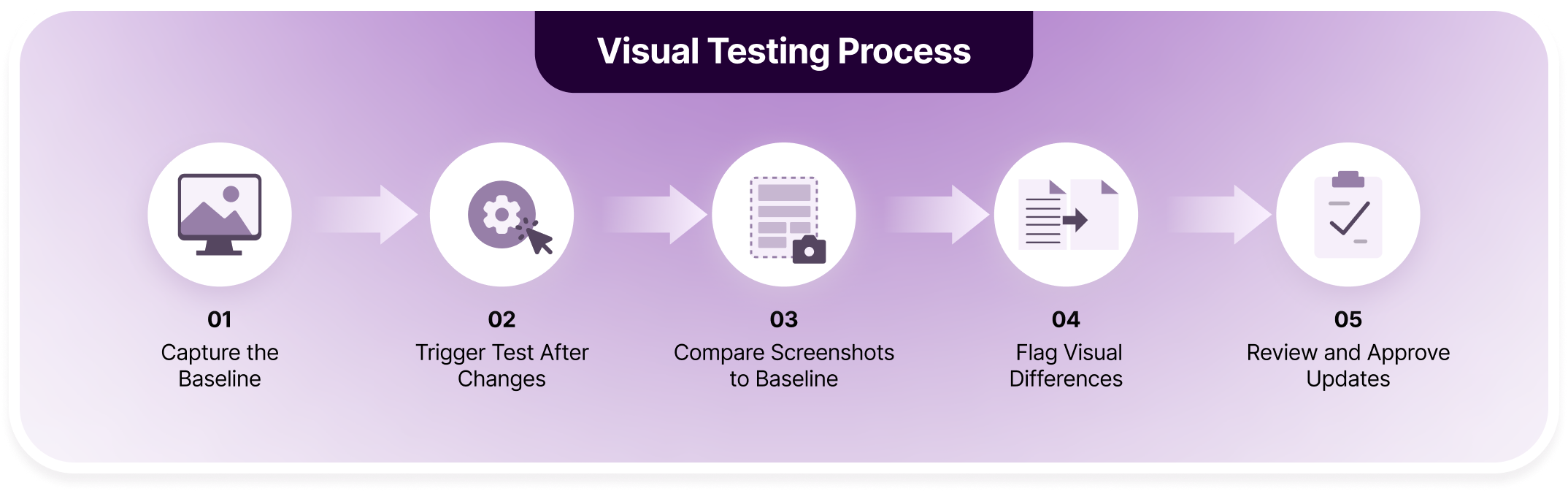
1. Capture the Baseline
The first step is generating a baseline snapshot of the application’s UI. This represents the approved visual state of a page, component, or flow.
Baselines are typically captured after a stable release and stored in a version-controlled visual testing system. They act as the reference point for all future comparisons.
2. Trigger Tests After Changes
Whenever code changes are pushed, whether CSS updates, UI component modifications, or layout adjustments, visual tests are automatically triggered.
This usually happens within pull requests or CI pipelines, ensuring that every UI change is validated before merging into the main branch.
3. Compare Screenshots to Baseline
The system captures new screenshots during test execution and compares them to the stored baseline images.
Comparison can be pixel-based, DOM-aware, or AI-assisted depending on the tool. Differences are calculated and highlighted for review.
4. Flag Visual Differences
If discrepancies exceed the configured threshold, the system flags them as visual regressions.
These differences may include layout shifts, color mismatches, missing elements, or unexpected spacing changes. Not all differences are bugs, but all require review.
5. Review and Approve Updates
Teams review the flagged differences in a visual dashboard. If changes are intentional, the new snapshot is approved and becomes the updated baseline.
If unintended, the issue is fixed before release. This approval workflow ensures visual quality is maintained without blocking valid design updates.
Best Practices For Visual Testing in 2026
Visual testing in 2026 goes far beyond simple screenshot comparison. Modern applications are dynamic, responsive, and personalized, which means visual validation must be intentional, stable, and tightly integrated into engineering workflows. The goal is not just detecting pixel differences, but identifying meaningful visual regressions without slowing teams down.
Effective visual testing balances precision with practicality. It minimizes noise, reduces false positives, and aligns with real user experiences across devices, browsers, and viewports. The following best practices help teams scale visual testing confidently.
- Start with a Clean, Approved Baseline: Capture baselines only after design and product sign-off to prevent locking in visual defects. Treat baseline creation as a controlled quality checkpoint, not a casual snapshot, because unstable baselines create long-term noise and unnecessary rework.
- Integrate Visual Testing into CI/CD Pipelines: Automate visual tests on every pull request so regressions are detected before merging to main branches. Continuous validation ensures visual issues are identified early, reducing costly fixes later in the release cycle.
- Prioritize Business-Critical User Flows: Focus initial coverage on high-impact journeys such as login, checkout, onboarding, and payments. These flows directly influence revenue and user trust, making them the highest priority for visual stability.
- Cover Multiple Viewports and Breakpoints: Validate layouts across mobile, tablet, and desktop screen sizes to prevent responsive layout failures. Even minor CSS updates can cause unintended shifts at specific breakpoints, making multi-viewport testing essential.
- Stabilize Dynamic and Animated Content: Disable animations, mock dynamic data, and control time-based elements during test execution. Reducing variability improves screenshot consistency and significantly lowers false positives.
- Use Intelligent Comparison Methods: Move beyond strict pixel-by-pixel comparisons by leveraging DOM-aware or AI-driven analysis. Intelligent comparison reduces noise while still identifying meaningful structural and layout regressions.
- Mask or Ignore Volatile Regions: Exclude predictable dynamic areas such as timestamps, rotating banners, or live feeds. Clearly defining ‘ignore’ regions ensures that you reduce false positives when visual testing and that reports stay actionable without hiding genuine defects.
- Adopt Component-Level Visual Testing: Test individual UI components in isolation to catch regressions earlier in development. Component testing scales efficiently and simplifies debugging before changes impact full pages.
- Test on Real Browsers and Devices: Enable cross-browser visual testing tools to render across different browser engines and real devices to capture font, spacing, and layout differences. Production-like environments provide more accurate validation than emulators alone.
- Define a Clear Review and Approval Workflow: Establish ownership for reviewing visual diffs and updating baselines to prevent uncontrolled approvals. A structured process ensures only intentional changes become the new visual standard.
- Set Practical Sensitivity Thresholds: Configure thresholds carefully to avoid over-sensitivity to minor rendering shifts. Balanced settings reduce alert fatigue while maintaining meaningful regression detection.
- Version-Control Baseline Updates: Track visual baseline updates alongside source code changes for traceability. This improves accountability and simplifies audits or rollback scenarios when needed.
- Align Visual Testing with Design Systems: Integrate visual validation testing into shared component libraries and design tokens. Changes to global styles should trigger broad visual checks to maintain consistency across the application.
- Monitor Visual Drift Over Time: Periodically review approved changes to prevent gradual UI degradation. Proactive audits help maintain long-term visual consistency and design integrity.
- Promote Shared Ownership Across Teams: Encourage collaboration between developers, designers, and QA during visual reviews. Shared accountability improves release confidence and reinforces a culture of visual quality.
Using BrowserStack Percy for Visual Testing
BrowserStack Percy is an AI-powered visual testing platform designed to help teams detect and manage UI regressions at scale. It combines intelligent visual comparison tests with automated stabilization techniques to reduce noise and eliminate flaky screenshots.
Percy’s AI-driven visual engine goes beyond pixel matching by understanding layout structures and identifying meaningful changes. Instead of flagging insignificant rendering shifts, it focuses on structural differences that impact user experience.
Some things can’t be easily tested with unit tests and integration tests, and we didn’t want to maintain a visual regression testing solution ourselves. Percy has given us more confidence when making sweeping changes across UI components and helps us avoid those changes when they are not meant to happen.

In addition, Percy runs on BrowserStack’s Real Device Cloud, enabling teams to validate visual changes across real browsers and devices rather than simulated environments.
Here are some key highlights of using Percy for visual automation:
| Feature | Description | Benefit |
|---|---|---|
| Visual AI Engine | AI-powered comparison that understands layout and structural changes instead of relying solely on pixel matching. | Reduces noise and detects meaningful UI regressions. |
| Snapshot Stabilization | Automatically freezes animations, dynamic content, and asynchronous elements before capturing screenshots. | Minimizes flaky tests and false positives. |
| Real Device Infrastructure | Runs tests on BrowserStack’s real device and browser cloud. Use over 50,000 real devices including android and iOS. | Ensures production-level rendering accuracy. |
| Mobile Web Visual Testing | Test your UI regressions across realistic mobile devices, screen sizes and viewports. | Prevents layout issues on smaller screens. |
| Intelligent Visual Diffing | Highlights exact areas of change with contextual overlays and smart grouping. | Speeds up debugging and approval workflows. |
| CI/CD Integrations | Seamlessly integrates with GitHub, GitLab, Jenkins, CircleCI, and more. | Automates visual testing in pull requests. |
| Component-Level Testing Support | Works with Storybook and modern UI frameworks for isolated component testing. | Detects regressions earlier in development. |
| Baseline Management & Versioning | Tracks visual history and allows controlled baseline approvals. | Maintains traceability and visual governance. |
| Parallel Test Execution | Runs visual tests concurrently across environments. | Reduces execution time and improves scalability. |
Thinking about switching to visual automation?
Percy introduces best-in-class AI-powered visual automation to scale across multiple branches, picking UI regressions 3x faster.

When to Deploy Visual Testing
Visual testing should be embedded throughout the software delivery lifecycle rather than treated as a final-stage activity. UI defects often emerge during layout changes, dependency updates, browser upgrades, or responsive adjustments.

Introducing visual checks at strategic stages helps teams detect unintended interface shifts early and maintain UI consistency across releases.
Key Moments to Use Visual Testing:
- During Pull Requests: Run visual checks automatically whenever a developer submits code. This helps detect unexpected UI shifts before changes are merged into the main branch.
- After UI Redesigns or Refactors: Large structural updates can unintentionally affect spacing, alignment, and responsiveness. Visual testing ensures that layout adjustments do not introduce new inconsistencies.
- Before Major Releases: Execute full visual regression suites prior to production deployment to confirm the interface remains consistent across supported browsers and devices.
- When Updating Dependencies: Browser engines, CSS frameworks, and frontend libraries may introduce subtle rendering changes. Visual checks quickly surface unexpected styling differences.
- For Responsive and Mobile Updates: Test across multiple screen sizes and real devices to detect layout breaks, overlapping elements, or scaling issues.
- After Browser or OS Updates: Rendering engines evolve, which can alter spacing, fonts, or component behavior. Running visual tests ensures compatibility remains intact.
- When Introducing New Components: Compare newly added UI elements against design standards to ensure consistency in typography, spacing, and visual hierarchy.
- In CI/CD Pipelines: Integrate visual testing into automated workflows so every deployment is automatically reviewed without manual effort.
- For White-Label or Themed Applications: When supporting multiple brand themes, visual testing ensures styling changes do not affect layout integrity.
- Post-Production Monitoring: Periodically re-run visual checks in live environments to detect environment-specific rendering issues.
Conclusion
Traditional functional tests confirm that features work, but they do not detect unintended layout shifts, styling inconsistencies, or rendering differences across browsers and devices. Incorporating visual testing closes this gap and ensures interface consistency at scale.
With AI-powered tools like Percy, combined with real device infrastructure and intelligent diffing, teams can reduce noise, eliminate flaky screenshots, and streamline review workflows. When integrated into CI/CD pipelines, visual testing shifts UI quality checks left, enabling faster releases without compromising design integrity.
Related Articles

End to End Snapshot Testing Using Cypress: A 2026 Guide
End-to-end snapshot testing with Cypress is simple. Learn how to use Percy for visual snapshots, red...

How to Report Bugs During Visual Regression Testing
Detect and report visual bugs efficiently with visual regression testing using Percy, CI integration...

20 Free Visual Testing Tools for 2026
Explore 20 free visual testing tools for 2026, compare their capabilities, and learn how Percy helps...