
Python Visual Testing in 2026

Introduction to Python Visual Regression Testing in 2026
Most developers today use Python for a wide range of work, from automation scripts to full web applications and test automation.
Surveys show Python remains among the most widely used languages worldwide, with nearly half of developers working with it and hundreds of millions of repositories on GitHub with Python code.
That disconnect between passing functionality and a visually correct interface is exactly where visual regression testing proves its value. It focuses on how an application looks after changes, not just whether it runs. When paired with Python automation, teams catch subtle interface issues earlier and keep releases predictable.
This article walks through how visual regression testing works, how to implement it using Python, and the visual testing tools and practices that make it reliable at scale.
What is Visual Regression Testing?
Visual regression testing checks whether the user interface of an application looks as expected after code changes. It works by capturing a snapshot of a page or component, then comparing it pixel by pixel or through visual diff algorithms. If differences appear, the system highlights them so teams can review what changed.
Not every difference signals a visual bug. Some changes are intentional, such as a new design update. Visual regression testing tools help teams quickly spot unintended shifts, broken layouts, missing elements, or styling inconsistencies before they reach users.
When integrated with Python-based automation frameworks, these visual checks become part of the regular test pipeline. That integration ensures the interface stays consistent as the application evolves.
Why is Automating Visual Tests Necessary?
User interfaces change often. Small CSS updates, dependency upgrades, or responsive tweaks can introduce visual defects that functional tests will never detect. Manual review becomes unreliable as the number of screens, devices, and releases increases.
- Faster Release Cycles: Frequent deployments leave little time for manual UI review. Automated visual tests run with every build, helping teams detect unexpected changes before release.
- Improved Consistency: Human reviewers may miss subtle spacing or alignment issues. Automated comparisons apply the same rules every time, reducing subjectivity.
- Device Scalability: Modern applications support multiple browsers and resolutions. Automation allows teams to cover more scenarios without increasing manual effort.
- Early Detection of UI Regressions: Small styling changes can cascade into larger layout problems. Automated visual checks highlight differences immediately after code changes.
- Seamless Integration with Python Test Suites: Many teams already use Python frameworks for automation. Adding visual testing to the same pipeline keeps the workflow centralized and easier to manage.
Manual visual reviews alone don’t take you anywhere. Bring automation to your testing suite with Percy.
How Visual Regression Testing Works
Visual regression testing compares the current state of a user interface against a previously approved version. The goal is to detect unintended changes after code updates. Different methods approach this comparison in different ways, depending on the level of detail and flexibility required.
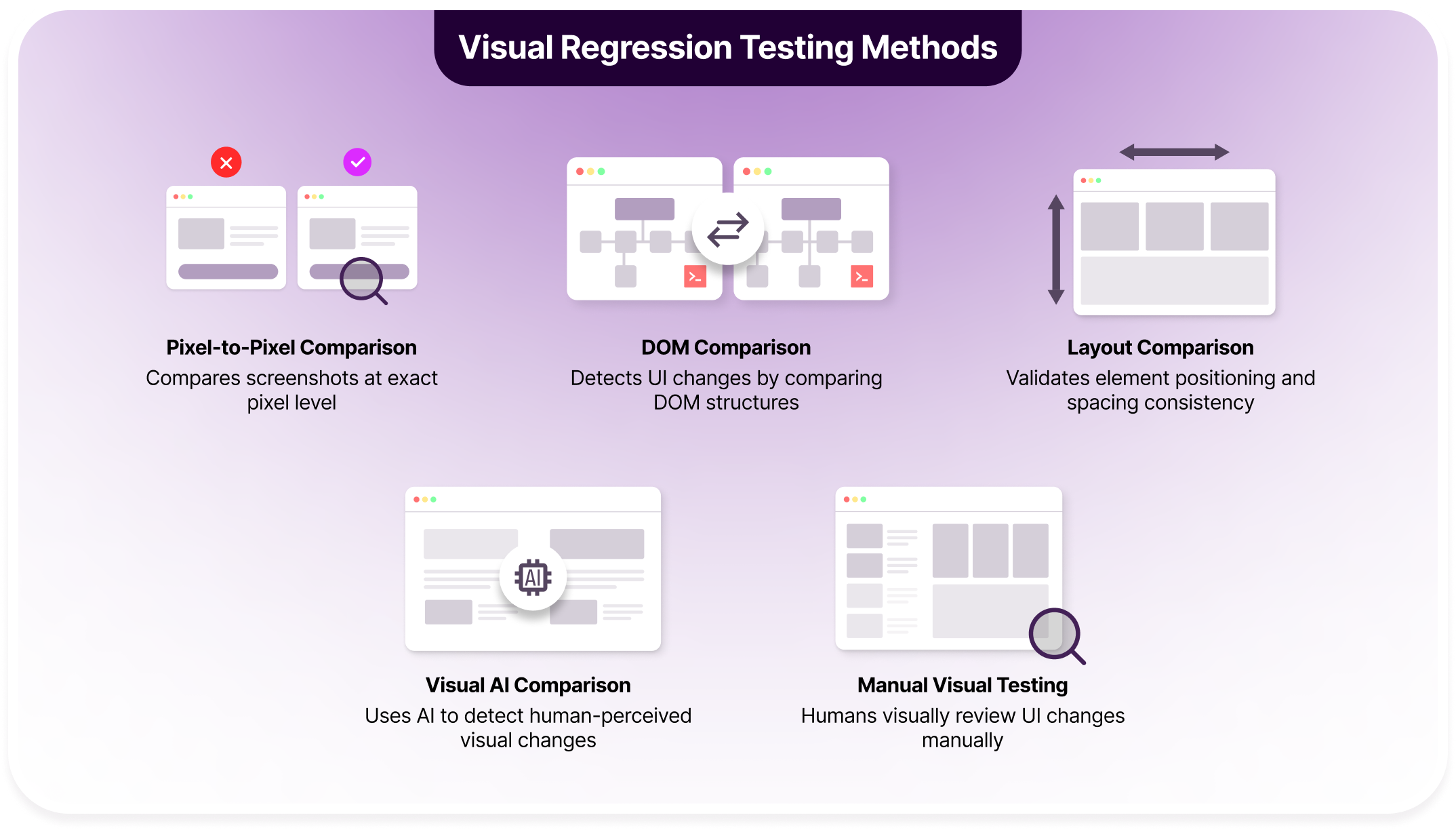
Below are the primary approaches used in modern visual regression testing:
Pixel-to-Pixel Comparison
This method compares two screenshots at the exact pixel level. Every pixel in the new image is matched against the baseline image to detect differences.
This screenshot testing method is highly precise and works well for catching small visual shifts, color changes, or missing elements. However, it can also flag minor rendering variations, such as anti-aliasing or font smoothing differences, which may not impact users.
DOM Comparison
DOM comparison focuses on the structure of the page rather than raw images. It analyzes the Document Object Model to identify changes in elements, attributes, or hierarchy.
This approach detects structural changes such as removed components, altered tags, or updated attributes. Visual styling differences may not always be captured unless combined with screenshot comparison.
Layout Comparison
Layout comparison checks the position, size, and spacing of elements on a page. Instead of comparing every pixel, it evaluates how components are arranged relative to one another.
This method is useful for detecting alignment issues, overlapping elements, or unexpected shifts in responsive designs. It reduces noise caused by minor visual rendering differences.
Visual AI Comparison
Visual AI methods analyze screenshots in a way that mimics human perception. Rather than focusing strictly on pixel differences, AI models evaluate whether the change is visually meaningful.
This approach helps reduce false positives caused by minor rendering changes. It is particularly effective for large applications where maintaining stable pixel baselines becomes challenging.
Manual Visual Testing
Manual visual testing relies on human reviewers to inspect UI changes. Testers compare screens before and after updates to identify issues.
Although this method provides contextual judgment, it does not scale well for large projects or frequent releases. Many teams combine manual review with automated visual comparison for better coverage and efficiency.
Implementing Python for Automated Visual Testing
Python makes it straightforward to integrate automated visual testing into an existing automation workflow. Most teams combine Selenium for browser control with image comparison libraries or visual testing platforms.
Below is a practical step-by-step example using Selenium + PyTest + a basic image comparison approach:
Step 1: Install Required Libraries
Install the dependencies:
pip install selenium pytest pillowYou will also need a browser driver such as ChromeDriver.
Step 2: Capture a Baseline Screenshot
The first run creates a reference image. This image represents the approved UI state.
from selenium import webdriver


def capture_baseline():

    driver = webdriver.Chrome()

    driver.get("https://example.com")


    driver.save_screenshot("baseline.png")

    driver.quit()


if __name__ == "__main__":

    capture_baseline()
Store baseline images in a dedicated directory such as baselines/.
Step 3: Capture a New Screenshot During Test Execution
During test runs, capture the current UI state.
def capture_current():

    driver = webdriver.Chrome()

    driver.get("https://example.com")


    driver.save_screenshot("current.png")

    driver.quit()
This image will be compared against the baseline.
Step 4: Compare Images Using Pillow
Use Python’s Pillow library to detect pixel differences.
from PIL import Image, ImageChops


def compare_images():

    baseline = Image.open("baseline.png")

    current = Image.open("current.png")


    diff = ImageChops.difference(baseline, current)


    if diff.getbbox():

        print("Visual differences detected!")

        diff.save("difference.png")

        return False

    else:

        print("No visual changes detected.")

        return True
ImageChops.difference() highlights pixel-level differences. If a bounding box exists, changes are detected.
Step 5: Integrate with PyTest
Automate the process inside a test case.
def test_visual_regression():

    capture_current()

    assert compare_images(), "UI has changed unexpectedly."
Running:
pytest test_visual.py
The test fails if visual differences appear.
Step 6: Improve Stability
Basic pixel comparison may produce noise. Improve reliability by:
- Fixing browser window size
- Waiting for elements to fully load
- Disabling animations
- Using headless mode consistently
- Masking dynamic elements like timestamps
Example with explicit wait:
from selenium.webdriver.common.by import By
from selenium.webdriver.support.ui import WebDriverWait
from selenium.webdriver.support import expected_conditions as EC

wait = WebDriverWait(driver, 10)
wait.until(EC.presence_of_element_located((By.ID, "main-content")))
Step 7: Scale with Dedicated Visual Testing Tools
For larger projects, teams integrate platforms that handle:
- Cross-browser rendering
- Smart diffing algorithms
- Baseline management
- Review workflows
Python acts as the orchestration layer, while the visual engine handles comparison complexity. A lot of teams adopt tools like Percy to implement AI capabilities and real device and browser infrastructure to their Python visual testing.
Combine Python Tests With Percy

How to Create Tests for Python Visual Regression Testing
Once Percy CLI is configured and connected to your project, the next step is writing automated visual test cases in Python. The goal is to capture meaningful UI states and track how they change over time.
This section walks through how to structure visual test cases, where to take snapshots, and how to interpret results.
Step 1: Identify What to Test
Start by selecting areas of the application that have high user impact or frequent UI updates.
Focus on:
- Homepage and landing screens
- Product or listing pages
- Checkout and payment flows
- Components with complex layouts
- Pages with custom styling or branding
Testing entire pages works well for broad coverage. Testing individual components provides more control and reduces noise.
Step 2: Write a Basic Percy Snapshot Test
Percy Python provides the percy_snapshot() function. It accepts a WebDriver instance and a snapshot name.
Example:
from selenium import webdriver

from percy import percy_snapshot


def test_homepage_visual():

    browser = webdriver.Chrome()

    browser.get("https://example.com")


    percy_snapshot(browser, "Homepage")


    browser.quit()
This captures the current browser state and uploads it to Percy for comparison.
Step 3: Automate a Real User Flow
Visual testing becomes more powerful when tied to user journeys.
Scenario:
- Open bstackdemo.com
- Select the first item
- Add it to cart
- Proceed to checkout
- Capture a snapshot
Example test:
from selenium import webdriver

from percy import percy_snapshot


def test_bstackdemo_checkout():

    browser = webdriver.Chrome()

    browser.get("https://bstackdemo.com")


    browser.find_element("class name", "text-center").click()

    browser.find_element("xpath", "//button[text()='Add to Cart']").click()

    browser.find_element("id", "cart").click()


    percy_snapshot(browser, "Checkout Page")


    browser.quit()
Step 4: Configure Snapshots Properly
Snapshot configuration improves reliability and performance.
Important considerations:
- Viewport sizes: Capture multiple screen widths for responsive layouts.
- Wait timing: Ensure dynamic content loads before taking snapshots.
- Mask dynamic elements: Ignore timestamps or rotating banners.
- Set diff sensitivity: Adjust how strict comparisons should be.
These settings reduce false positives and improve test stability.
Step 5: Run Tests with Percy CLI
Execute tests through Percy so snapshots upload correctly.
export PERCY_TOKEN=[your-project-token]

percy exec -- pytest
During execution, Percy:
- Creates a build
- Uploads snapshots
- Compares them against the baseline
- Highlights visual differences
Build results are available in the Percy dashboard.
Step 6: Review Approvals and Reports
After test execution:
- Review highlighted differences
- Approve intentional UI changes
- Reject unexpected regressions
- Add comments for collaboration
The dashboard shows snapshot counts, detected changes, and overall build status. This review workflow keeps visual changes transparent across teams.
Step 7: Integrate into CI/CD
Visual tests should run automatically during deployments.
Common integrations include:
- Jenkins
- GitHub Actions
- Travis CI
Each build triggers visual comparison, helping teams detect UI changes before merging or releasing code.
Debugging and Maintenance
- Review logs from the test run
- Confirm the environment matches baseline conditions
- Check for rendering inconsistencies
- Update baselines only after verifying intentional changes
Strong test design and stable snapshot practices reduce long-term maintenance effort.
Top Tools to Consider for Python Visual Regression Testing
Python integrates well with a range of visual testing tools. Some focus on pixel comparison, others combine structural analysis with AI-based detection. The right choice depends on project size, release frequency, and how much baseline management you want to handle manually.
BrowserStack Percy
BrowserStack Percy is a cloud-based visual testing software designed to automate UI comparisons across browsers and devices. It integrates with Python test frameworks such as PyTest and Selenium, allowing teams to add visual checks to existing automation suites without major restructuring.
Percy captures DOM snapshots instead of raw screenshots. This approach allows it to re-render pages across multiple browsers in the cloud, reducing the need to manage separate test environments locally. It also supports intelligent diffing, which helps reduce noise caused by minor rendering differences.
For teams running frequent deployments, Percy provides centralized baseline management and a structured review workflow. Visual changes are grouped into builds, making it easier to track UI updates across releases.
Highlights of using BrowserStack Percy:
| Feature | Description | Impact |
|---|---|---|
| Visual AI Diffing | Uses intelligent comparison algorithms that focus on meaningful visual changes instead of raw pixel differences. Filters out minor rendering inconsistencies such as anti-aliasing or subpixel shifts. | Reduces false positives, allowing teams to review only relevant UI changes and move faster during approvals. |
| DOM Snapshot Rendering | Captures the page DOM and assets, then re-renders them across supported browsers in the cloud. This avoids relying solely on static screenshots from one environment. | Enables accurate cross-browser comparisons without maintaining multiple local browser setups. |
| Cross-Browser Coverage | Automatically renders snapshots across browsers such as Chrome, Firefox, Edge, and Safari using cloud infrastructure. | Ensures UI consistency across environments and reduces production surprises caused by browser-specific rendering differences. |
| Responsive Snapshot Support | Supports capturing multiple viewport widths within a single test execution. Teams can define mobile, tablet, and desktop resolutions. | Improves coverage of responsive breakpoints and helps detect layout shifts specific to certain screen sizes. |
| Parallel Test Execution | Runs visual tests alongside functional tests and supports parallelization in CI pipelines. | Shortens build times and prevents visual testing from slowing down release cycles. |
| Baseline Management | Maintains versioned baselines tied to branches and builds. Allows controlled updates when UI changes are intentional. | Simplifies long-term maintenance and prevents accidental overwriting of approved UI states. |
| Build Review Workflow | Provides a visual dashboard where teams can inspect diffs, approve changes, or request fixes. Includes side-by-side and overlay comparisons. | Improves collaboration between QA, developers, and designers by centralizing UI review. |
| CI/CD Integration | Integrates with tools like GitHub Actions, GitLab CI, Jenkins, CircleCI, and others. Snapshots automatically run during pull requests or deployments. | Embeds visual testing into the development lifecycle, ensuring UI checks occur before code merges. |
| Real Device Cloud Access | Through BrowserStack’s real device infrastructure, snapshots can be validated against actual mobile devices and browsers. | Increases confidence in mobile web rendering accuracy and reduces reliance on emulators. |
| Smart Change Grouping | Groups related snapshot changes within a single build, making it easier to review updates tied to a feature or commit. | Provides better traceability of UI updates and reduces review fatigue. |
| Access Control and Permissions | Supports team roles and permission controls for approving builds and managing projects. | Maintains governance in larger teams and prevents unauthorized baseline updates. |
| Scalability for Large Projects | Handles thousands of snapshots per build and supports enterprise-scale applications. | Makes it suitable for complex products with frequent UI changes and large test coverage. |
PyTest
PyTest is a popular Python testing framework widely used for unit, integration, and functional testing. While it is not a visual testing tool by itself, it serves as a strong foundation for building automated visual regression workflows when combined with image comparison libraries.
Key Features:
- Flexible Test Structure: Simple syntax and fixture support make it easy to organize visual test cases alongside functional tests.
- Rich Plugin Ecosystem: Supports plugins for parallel execution, reporting, and CI integration, which helps scale visual test runs.
- Assertion Introspection: Clear failure messages make debugging image comparison mismatches easier.
- CI/CD Compatibility: Works seamlessly with Jenkins, GitHub Actions, GitLab CI, and other automation tools.
- Parameterized Testing: Enables running visual tests across multiple browsers, viewports, or datasets efficiently.
What’s Missing:
- No built-in visual diff engine or intelligent comparison system.
- No baseline management dashboard or approval workflow.
- No cross-browser cloud rendering or DOM snapshot re-rendering capabilities.
BackstopJS
BackstopJS is an open-source visual regression testing tool focused on screenshot comparison. Although JavaScript-based, it can be integrated into Python-driven workflows through CLI execution.
Key Features:
- Scenario-Based Testing: Define test scenarios with specific viewports and interactions.
- Pixel-Level Image Comparison: Detects visual differences using configurable mismatch thresholds.
- Responsive Testing Support: Easily test across multiple viewport sizes.
- Headless Browser Execution: Uses Puppeteer or Playwright for automated rendering.
- Detailed HTML Reports: Generates visual diff reports for review.
What’s Missing:
- No AI-based visual diffing.
- No cloud-based cross-browser rendering infrastructure.
- No centralized baseline management across branches or teams.
Vizregress
Vizregress is a lightweight Python-based visual regression testing tool designed for simple screenshot comparison workflows.
Key Features:
- Python-Native Integration: Designed specifically for Python automation environments.
- Baseline Image Comparison: Compares new screenshots against stored reference images.
- Lightweight Setup: Minimal configuration required for basic visual checks.
- Custom Threshold Configuration: Allows tuning of acceptable difference levels.
- Local Execution Support: Runs entirely within local or CI environments without external services.
What’s Missing:
- No cross-browser cloud rendering support.
- No structured build review dashboard or approval workflow.
- No intelligent diffing that filters minor rendering variations.
Best Practices For Python Visual Regression Testing
When talking about the best practices for visual testing, you have to start with the foundation, in perfecting the main components. Poorly configured visual tests often produce noise, which reduces trust in results. The following practices help ensure reliable outcomes over time.
- Keep Baselines Clean and Versioned: Store baseline images in a structured way and tie them to branches or releases. Update baselines only after confirming intentional UI changes.
- Control the Test Environment: Fix browser versions, screen resolutions, and system settings. Environmental differences can cause inconsistent rendering and unnecessary diffs.
- Disable Animations and Transitions: CSS animations, hover effects, and delayed transitions create unstable screenshots. Turn them off during test execution using custom styles or configuration.
- Wait for Stable Page States: Ensure all key elements are fully loaded before capturing snapshots. Use explicit waits instead of fixed sleep timers.
- Mask Dynamic Content: Hide timestamps, rotating banners, ads, or personalized greetings. This keeps comparisons focused on meaningful layout and styling changes.
- Test Critical User Flows: Prioritize pages and components that directly affect user experience, such as checkout or login flows. Avoid over-testing low-impact areas.
- Capture Multiple Viewports: Responsive layouts can behave differently across devices. Include mobile, tablet, and desktop widths in your test coverage.
- Review Diffs Promptly: Address visual differences as soon as they appear in builds. Delayed review often leads to confusion about which changes were intentional.
- Integrate Visual Tests into CI/CD: Run visual checks automatically during pull requests or deployments. This ensures UI consistency before code reaches production.
- Avoid Overly Strict Diff Thresholds: Extremely sensitive comparisons may generate frequent false alarms. Adjust thresholds to balance precision with practicality.
Want to Automate From One Place?
Percy acts as a mothership to host all your visual testing frameworks including CI/CD pipelines to synchronize your visual testing efforts.
Conclusion
Visual regression testing adds a critical layer of confidence to modern software development. Functional tests confirm that features work, but they do not guarantee that the interface still looks correct. Small visual changes can affect usability, trust, and brand consistency.
Python makes it practical to integrate visual testing into existing automation workflows. With frameworks like PyTest and Selenium, teams can capture UI states, compare them against baselines, and detect unexpected changes early in the release cycle.
Choosing the right tool determines how scalable and maintainable your approach will be. Lightweight setups offer flexibility and control, while platforms like BrowserStack Percy provide structured review workflows, intelligent diffing, and cross-browser coverage.
When implemented thoughtfully, visual regression testing becomes part of the everyday development process. It reduces surprises in production and helps teams ship UI updates with greater confidence.
Related Articles

Top 20 Visual Testing Tools for 2026
Explore the top 20 visual testing tools for 2026 and learn which platforms best catch UI regressions...

What is Component Testing? 2026 Beginner Guide
Learn component testing: techniques, processes, benefits, and automation to catch defects early and ...

How Can Visual Diff Testing Improve Your UI Checks?
Understand visual diff testing, its benefits for UI testing, and how to automate visual comparisons ...