
Catch UI mismatches with Storybook

How to Perform Visual Regression Testing Using Storybook: 2026 Guide
You cannot catch visual bugs at the page level when the real issues live inside components.
Tests confirm props, states, and interactions, so everything looks correct in isolation. Meanwhile, padding shifts, icons misalign, and variants drift across screens. The problem isn’t a lack of testing, it’s testing at the wrong level.
Storybook was built to solve that visibility gap, isolating components and their states, which makes visual changes easier to spot early. Today, Storybook is used by tens of thousands of teams and has over 80,000 GitHub stars, which shows how central component-driven development has become.
Still, Storybook alone doesn’t compare visuals or track regressions over time.
In this article, I’ll explain what Storybook visual regression testing is and where it fits best. I’ll walk through how to perform visual testing on Storybook using Percy, highlight the benefits of this approach, and share key tips to keep component-level visual tests stable and scalable.
What is Storybook Visual Regression Testing?
Storybook visual regression testing focuses on detecting unintended visual changes at the component level. Instead of testing full pages or user flows, it captures snapshots of individual components in specific states and compares them against approved baselines.
This makes it easier to catch UI drift where it actually starts, inside buttons, forms, modals, and layout primitives.
Because components are rendered in isolation, visual differences are clearer and more predictable. Changes caused by CSS updates, design tweaks, or dependency upgrades surface immediately without interference from unrelated page logic.
When paired with a visual comparison testing tool, Storybook becomes a reliable way to monitor how UI components evolve over time.
30% UI Regressions Are Still Missed Without The Right Tool
How Does Storybook Visual Regression Testing Work?
Storybook visual regression testing follows a structured workflow that turns component stories into reliable visual test cases. Once set up, the process runs automatically in CI, helping teams catch unintended visual UI changes early, before they reach production.

Step 1: Define Component States Using Stories: Storybook stories capture every meaningful visual state of a component, such as variants, sizes, and edge cases. Each story acts as a repeatable visual test, which is why teams using Storybook often achieve higher component reuse and more consistent UI patterns.
Step 2: Capture Baseline Snapshots: During the first visual test run, screenshots are captured for every story in a controlled environment. These images become the visual baselines and are stored centrally, often in the cloud, to ensure consistency across machines and contributors.
Step 3: Automatically Compare Snapshots After Changes: When code changes are introduced, new snapshots are generated and compared against the existing baselines. This comparison happens automatically in CI, allowing visual regressions to be detected on every pull request without manual intervention.
Step 4: Review Visual Differences with Context: If differences are found, the visual testing tool generates visual diffs that highlight exactly what changed. Developers and designers can review changes side by side, which makes it easier to distinguish intentional design updates from accidental regressions.
Step 5: Approve Updates or Fix Regressions: Intended visual changes are approved and promoted as new baselines. Unintended changes require fixing the underlying code before tests are rerun. This approval workflow helps maintain visual consistency while allowing the UI to evolve safely.
Major Storybook Visual Regression Testing Tools for 2026
Visual regression testing for Storybook helps teams catch unintended UI changes at the component level early in development. Several tools in 2026 provide different approaches, from fully managed cloud platforms to open-source frameworks, each with its own strengths and trade-offs.
BrowserStack Percy
Percy is an AI-powered visual testing and review platform designed to automate visual regression across components, pages, and environments. It integrates directly with Storybook, CI/CD pipelines, and existing test suites, capturing snapshots and intelligently filtering visual noise to highlight only meaningful UI changes.
Percy also offers centralized baselines, cross-browser coverage, and collaborative review workflows, making it a top choice for teams that want scalable visual testing with minimal manual overhead.
In addition to core Storybook workflows, Percy supports cross-device and responsive testing across thousands of real browser/device combinations, snapshot stabilization to handle animations and dynamic elements, and seamless CI/CD integration with popular tools like GitHub, GitLab, Bitbucket, CircleCI, and more.
The overall compounded impact of AI in Percy is transformation and drastic. You’re getting your money’s worth and at the end of the day, you’re net positive on the investment.

Below are key features of Percy that make it well suited for Storybook visual regression:
| Feature | Impact |
|---|---|
| CI/CD Integrations | Automatically runs visual tests on commit, pull request, or merge to catch visual regressions before code reaches main branches. |
| Cross-Browser & Device Coverage | Tests component snapshots across thousands of browsers and real devices to validate UI consistency everywhere. |
| Snapshot Stabilization | Freezes animations and minimizes noise from dynamic content, making visual tests more reliable. |
| Visual AI Noise Filtering | Uses intelligent algorithms to ignore minor rendering noise and focus on meaningful differences. |
| Collaborative Review Dashboard | Teams can approve or reject visual changes together with context and historical baselines. |
| Parallel Testing Support | Speeds up visual regression runs by executing snapshots concurrently across environments. |
| Responsive Viewport Testing | Validates UI snapshots at multiple breakpoints and resolutions. |
| Versioned Baseline Management | Tracks baselines over time and across branches, reducing maintenance burden. |
| Team Notifications & Integrations | Integrates with Slack, Teams, and other tools to communicate visual test results. |
Want to Automate From One Place?
Percy acts as a mothership to host all your visual testing frameworks including CI/CD pipelines to synchronize your visual testing efforts.

Chromatic
Chromatic is a visual testing and UI review platform built specifically for Storybook. It captures pixel-perfect component snapshots from your Storybook stories and conducts cross browser visual testing, flagging any visual changes automatically.
Chromatic runs tests in the cloud for every commit, provides parallel execution by default, and lets teams review changes directly inside Storybook or in a dashboard.
Key Features of Chromatic:
- Run automated visual tests for every Storybook commit in parallel.
- Browser coverage across Chrome, Firefox, Safari, and Edge with responsive viewport testing.
- In-Storybook review and baseline acceptance for faster feedback loops.
Limitations of Chromatic:
- Primarily focused on Storybook, not general application pages.
- Baselines and review workflows may require paid plans for team scale.
- Can be less flexible for custom CI/CD workflows outside Storybook.
Playwright
Playwright is a browser automation framework with built-in visual comparison features. It lets you capture screenshots during tests and compare them to baselines to detect UI changes. While not Storybook-specific, Playwright’s visual comparisons can be adapted to component snapshots or used alongside Storybook for broader UI testing.
Key Features of Playwright:
- Native visual comparison as part of Playwright tests.
- Multi-browser and multi-platform automation.
Limitations of Playwright:
- Lacks Storybook-centric integrations or cloud dashboards.
- Baseline management must be handled manually or with custom tooling.
- Not optimized for component-driven workflows out of the box.
Loki
Loki is an open-source visual regression tool tailored for Storybook projects. It captures Storybook snapshots and compares them across platforms supported by Storybook, aiming to be reproducible and easy to maintain.
Key Features of Loki:
- Designed for Storybook with minimal configuration.
- Supports headless testing and reproducible environments.
Limitations of Loki:
- Limited UI or dashboard for reviewing diffs.
- Requires more manual setup for CI and reporting.
- Smaller ecosystem and fewer integrations compared to managed tools.
BackstopJS
BackstopJS is a flexible open-source visual regression testing tool that uses JSON configurations to script screenshot comparisons. It works well for responsive design and breakpoint testing but is not Storybook-specific.
Key Features of BackstopJS:
- Responsive testing across multiple viewports.
- Customizable, open-source configuration.
Limitations of BackstopJS:
- No built-in Storybook integration; stories must be rendered manually.
- No centralized dashboard for diff review.
- Higher maintenance for baselines and CI workflows.
How to Perform Storybook Visual Regression Testing Using Percy
Running visual regression tests on Storybook with Percy turns your component library into a continuously validated visual system. Percy captures snapshots of every Storybook story, compares them against approved baselines, and highlights unintended UI changes automatically in CI.
Below is a step-by-step breakdown of how this workflow typically works in practice.
Step 1: Prepare and Structure Your Storybook Stories
Start by ensuring your Storybook stories represent all meaningful visual states of each component. This includes variants (primary, secondary), sizes, disabled states, error states, and edge cases with long text or missing data. Each story acts as a visual test case, so well-structured stories directly improve visual coverage and reduce blind spots.
Step 2: Install Percy and Storybook Dependencies
Add Percy to your project as a development dependency. Percy works by scanning your Storybook build and capturing snapshots automatically.
npm install --save-dev @percy/cliNo changes are required inside individual stories, which keeps the setup lightweight and avoids polluting component code.
Step 3: Build Storybook for Visual Testing
Percy tests a static Storybook build to ensure consistent rendering across environments. Generate a production-ready Storybook build using:
npm run build-storybookThis creates a static output that Percy can reliably snapshot, avoiding inconsistencies caused by local development servers.
Step 4: Create a Percy Project and Set the Token
In the Percy dashboard, create a new project and copy the generated project token. Set it as an environment variable so Percy can associate snapshots with the correct project.

export PERCY_TOKEN=<your_token>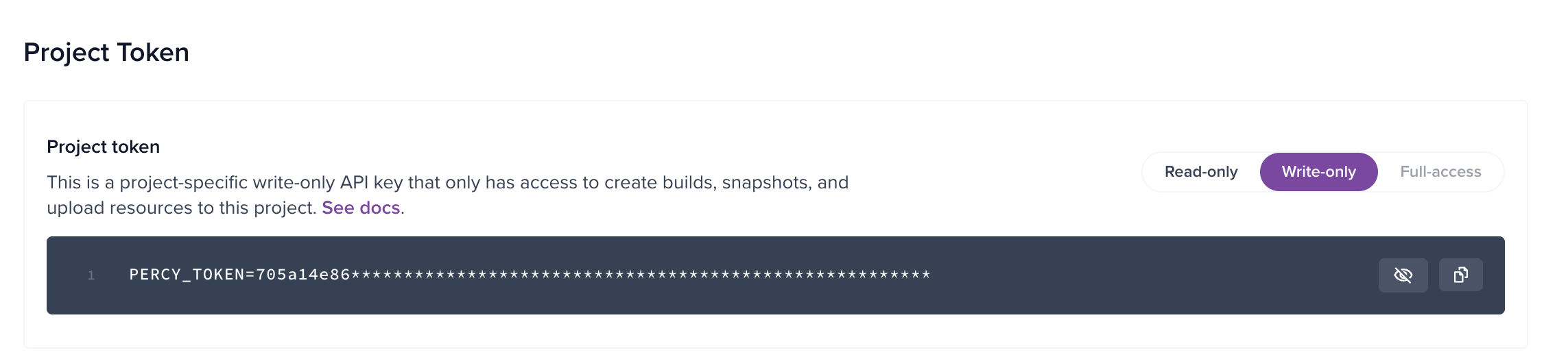
This token is typically stored securely in CI to ensure visual tests run automatically on every commit or pull request.
Step 5: Run Percy Against Storybook
Execute Percy with your Storybook build using the following command:
npx percy exec -- npx serve storybook-staticPercy scans the Storybook stories, captures snapshots for each component state, and uploads them to the dashboard for comparison.
Step 6: Review Visual Changes in the Percy Dashboard
After the run completes, Percy generates visual diffs for any changes detected. You can view baseline, current, and diff images side by side, with highlights showing exactly what changed. Reviewers can quickly decide whether a change is an intentional design update or an accidental regression.
Step 7: Approve Intended Changes or Fix Regressions
Approved changes become the new baseline, allowing the UI to evolve safely. If a change is unintentional, fix the underlying code and rerun the tests. This approval flow prevents visual drift while still enabling rapid iteration on components.
Step 8: Automate the Workflow in CI
Integrate Percy with your CI pipeline so Storybook visual tests run on every pull request. This ensures that visual regressions are caught before merging, and design changes are reviewed alongside code changes.
This approach scales well as component libraries grow. Storybook defines what should be tested visually, while Percy handles snapshot capture, intelligent comparison, and team-wide review without adding maintenance overhead to your test suite.
Percy replaces 80% of your manual visual checks and provides 3X faster reviews
Benefits of Using Storybook for Visual Testing
Storybook makes visual testing more focused and predictable by shifting attention to individual components instead of full pages. When paired with visual regression tools, it helps teams detect UI issues earlier and maintain consistency as design systems evolve.
- Component-Level Accuracy: Visual tests run on isolated components, making it easier to pinpoint exactly where a UI change was introduced.
- Early Detection of Visual Regressions: Visual issues are caught during development, before components are composed into complex pages or flows.
- Improved Design System Consistency: Regressions across shared components surface immediately, helping teams maintain a unified visual language.
- Clearer Visual Test Coverage: Each story represents a known UI state, creating transparent and intentional visual test coverage.
- Reduced Test Flakiness: Isolated rendering minimizes interference from unrelated logic, data, or network conditions.
- Faster Debugging and Fixes: Smaller, focused snapshots make visual diffs easier to understand and resolve.
- Better Collaboration Between Teams: Designers, developers, and QA can review component changes using the same visual reference.
- Scales Well With Growing Libraries: Adding new components automatically extends visual coverage without rewriting test logic.
- Framework-Agnostic Usage: Storybook supports multiple frontend frameworks, making visual testing reusable across projects.
- Stronger Confidence in UI Releases: Teams ship component changes knowing visual behavior has been verified systematically.
Conclusion
Storybook visual regression testing brings visual validation closer to where UI issues actually begin, at the component level. By isolating components and their states, teams gain clearer visibility into visual changes and reduce the risk of regressions spreading across applications.
When combined with Percy, Storybook becomes a powerful visual safety net. Percy automates snapshot comparison, reduces flaky results, and adds collaborative review workflows, making it easier to scale visual testing as design systems and component libraries grow.
Related Articles

Top 6 Automated Visual Testing Tools for Selenium in 2026
Discover top automated visual testing tools for selenium integration. Choose among 2026’s top tool...

What is Visual Validation Testing?
Understand how visual validation testing works, its importance and impact in visual testing, and how...
Using Visual Testing to Improve eCommerce Conversion Rates
Improve UX and conversions with ecommerce visual testing. Detect layout breaks, rendering issues, an...