
What is Visual Testing in Software Testing?

What is Visual Testing in Software Testing?
As software testers, we’re all wired to catch the functional issues: checking if a button works, if the link redirects correctly, if users can add their data properly.
While all of this is crucial, there is another dimension of issues that doesn’t get the same share of scrutiny. In fact, nearly 88% of users would choose to abandon an application if they stumble across this issue.
Visual bugs are UI regressions that slip from every functional test and affect your application in the form of overlapping buttons, misaligned layouts, inconsistent fonts, etc. They make up to about 50% of all UI bugs during production, something you cannot ignore as a software tester.
Through this article, you can learn how to add visual testing to your existing software testing strategy, and what are some of the best tools to conduct visual testing in 2026.
Visual Testing in Software Testing: What It Means
Visual testing focuses on validating how an application looks to users, not just whether it functions correctly. Instead of checking logic, data flow, or backend responses, visual testing focuses on evaluating the rendered UI against design expectations.

Visual regression testing helps catch issues such as broken layouts, misaligned elements, incorrect fonts, spacing inconsistencies, and color deviations. It uses a method of visual comparison test to review visual screenshots with an approved visual component, called a baseline.
In the software development life cycle, visual testing can be added as an integral part of QA, evaluating how your product looks and is perceived by users. Visual testing can expand towards cross browser visual testing, to verify your application across different browsers across different devices.
Visual impressions form in 0.5 seconds, use Percy to perfect your website UI.
How Does Visual Testing Work?
Visual testing works by validating how your application looks at different stages of development. Instead of relying on manual UI reviews, it uses automated screenshot comparisons to detect visual changes early and consistently.
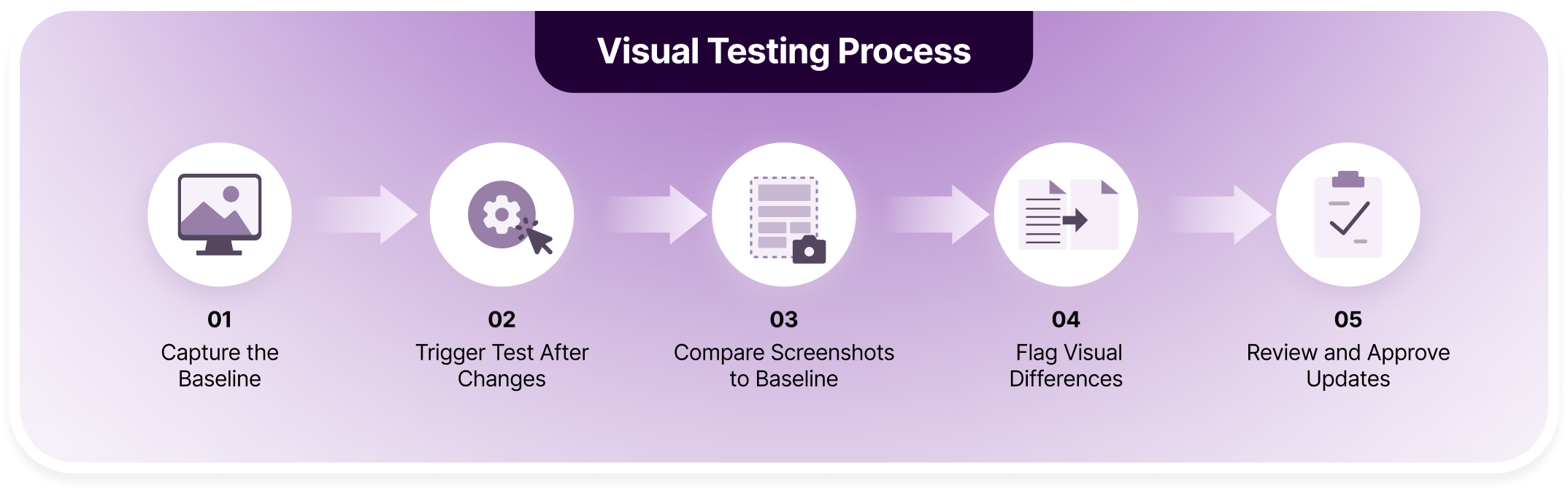
Below is a step-by-step breakdown of how the visual testing process typically works:
Step 1: Capture the Baseline
The process starts by capturing screenshots of your application in its expected, approved state. These baseline images act as the visual source of truth for future comparisons. Baselines are usually captured across defined browsers, devices, and viewports to reflect real user environments.
Step 2: Trigger Tests After Changes
Whenever code changes are introduced, such as UI updates, CSS changes, or component refactors, visual tests are automatically triggered. This often happens through CI pipelines or test runs tied to pull requests. Each test run captures new screenshots at the same UI states as the baseline.
Step 3: Compare Screenshots to Baseline
The newly captured screenshots are compared against the approved baselines. The comparison can be pixel-based, layout-based, or AI-driven, depending on the tool. This step identifies even subtle differences caused by rendering changes, styling updates, or browser behavior.
Step 4: Flag Visual Differences
Any detected differences are highlighted as visual diffs, showing exactly what changed and where. These diffs help testers quickly understand whether the change is expected or indicates a visual bug. Noise from dynamic content may be filtered out using stabilization or AI techniques.
Step 5: Review and Approve Updates
Testers, developers, or designers review the flagged changes and decide whether to approve or reject them. Approved changes update the baseline, while rejected ones signal a visual defect that needs fixing. This final step ensures visual quality without slowing down delivery.
What Are the Benefits of Implementing Visual Tests in Software Testing?
Software testers add a critical layer of confidence to UI quality through visual validation testing that verifies what users actually see. Beyond catching bugs, it improves collaboration, consistency, and release reliability as applications scale.
- Catches Visual Bugs Functional Tests Miss: Functional tests confirm that features work, but they do not verify how they look. Visual testing detects layout breaks, misaligned elements, font issues, spacing errors, and color inconsistencies before users notice them.
- Reduces Reliance on Manual UI Reviews: Manually reviewing screens after every change is time-consuming and error-prone. Visual tests automate repetitive visual checks, allowing testers to focus on high-value review decisions instead of routine inspections.
- Improves Cross-Browser and Device Confidence: Different browsers and devices render UI differently. Visual testing validates consistency across environments, ensuring the application looks correct for users regardless of browser, screen size, or operating system.
- Speeds Up Release Cycles: Automated visual checks run alongside existing test suites and CI pipelines. This helps teams catch UI issues early, reducing last-minute fixes and preventing release delays caused by visual regressions.
- Enhanced Collaboration Between Teams: Visual diffs provide clear, shareable evidence of UI changes. Developers, testers, and designers can review the same visual context, align faster on decisions, and reduce back-and-forth discussions.
- Protects Brand and Design Consistency: Consistent visuals are critical to brand trust. Visual testing ensures typography, colors, spacing, and components remain aligned with design standards across releases and platforms.
Percy Guarantees 3× Faster UI Reviews

7 Major Visual Testing Solutions for Software Testing in 2026
Modern visual testing tools vary widely in how they detect changes, scale across environments, and fit into existing workflows. I’ve selected these tools after carefully reviewing their core proposition, how they carry out automated visual testing frameworks, and how convenient they are for beginners.
7 Major Visual Testing Solutions for Software Testing in 2026
1. BrowserStack Percy: Automated visual regression testing across browsers and devices
2. Applitools Eyes: AI-powered visual testing with intelligent difference detection
3. Galen Framework: Layout and responsive design testing using visual specifications
4. BackstopJS: Open-source visual regression testing using screenshot comparisons
5. Chromatic: Visual testing and review workflow built for Storybook
6. Storybook: Component-driven UI development and visual testing environment
7. Visual Regression Tracker: Open-source visual regression testing with self-hosted control
1. BrowserStack Percy
BrowserStack Percy is an AI-powered visual testing software that helps teams catch visual bugs early without dealing with flaky comparisons or infrastructure overhead. Percy brings a stack of advanced features for visual bug detection and instant resolution.
Percy reduces false positives and noise through a native AI-review system. It also features a mature diff control system to filter diff criteria and handpick selected regressions.
All these features are tied to the biggest real device cloud infrastructure, hosting over 50,000 devices across Windows, Mac, iOS, and Android. It also seamlessly integrates with widely used CI/CD pipelines, SCM frameworks, and other design and testing tools.
Some things can’t be easily tested with unit tests and integration tests, and we didn’t want to maintain a visual regression testing solution ourselves. Percy has given us more confidence when making sweeping changes across UI components and helps us avoid those changes when they are not meant to happen.

How BrowserStack Percy Helps Testers:
| Feature | Description | How It Helps Testers |
|---|---|---|
| AI Visual Review Agent | Uses visual AI to detect meaningful UI changes while ignoring rendering noise. | Reduces false positives and prevents wasting time reviewing irrelevant diffs. |
| Visual AI Engine | Utilize AI-powered visual enhancement for image comparisons with advanced algorithms | Improve visual accuracy and speed by detecting meaningful changes and optimizing performance. |
| Snapshot Stabilization | Freezes animations and handles dynamic content during screenshot capture. | Ensures consistent, repeatable snapshots across test runs. |
| Region Diff Control | Use advanced diff control systems to pick intended visual changes from dynamic content | Minimize visual noise coming from dynamic content |
| Real Device Cloud | Conduct visual tests on Percy’s real device cloud of over 50,000 devices, browsers and viewports. | Confirms UI consistency across all environments users actually access. |
| Linear Visual Workflow | Perform sequential changes under a single branch with ease. | Prevent merge conflicts with each branch for simplified bug tracking. |
| CI/CD Integration | Integrates with popular CI tools and automation frameworks effortlessly. | Automatically validates UI changes with every code push or pull request. |
Verdict:
BrowserStack Percy stands out as a purpose-built visual testing solution that balances depth, reliability, and ease of use. Its AI-driven diffing and snapshot stabilization make visual validation testing far more dependable than simple pixel comparisons.
Built-in cross-browser coverage, CI/CD integration, and collaborative review workflows help teams catch visual bugs early and speed up UI releases. Percy is especially valuable for teams shipping frequently and maintaining complex UI components across browsers and responsive breakpoints.
Pricing:
Percy offers a free tier that allows teams to get started with visual validation testing without upfront cost. The free plan typically includes monthly screenshot limits, access to cross-browser visual comparisons, basic CI/CD integration, and unlimited users. Paid plans start from $599 per month for web and mobile testing.
Thinking about switching to visual automation?
Percy introduces best-in-class AI-powered visual automation to scale across multiple branches, picking UI regressions 3x faster.
2. Applitools Eyes
Applitools Eyes is an enterprise-focused visual validation platform that uses AI-driven comparison to identify meaningful UI changes. It supports cross-browser and cross-device testing through a cloud execution grid. The tool is commonly used by large teams needing high-scale visual coverage and advanced comparison logic.
Key Features of Applitools Eyes:
- AI-powered visual comparison engine that reduces false positives across UI changes
- Ultrafast Grid for parallel execution across browsers, devices, and viewports
- Deep integrations with popular automation frameworks and CI/CD pipelines
Major Limitations of Applitools Eyes:
- Infrastructure Dependency: Does not provide native real-device infrastructure, relying on external browser execution environments.
- Pricing Complexity: Costs scale rapidly with snapshot volume, making long-term budgeting difficult for growing teams.
- Learning Curve: Configuration and tuning AI match levels require experience to avoid over or under detection.
Verdict:
Applitools Eyes is suitable for AI-driven visual validation at scale. However, with no native real device cloud and maintenance overhead, it may require additional tool support for visual testing for enterprise level teams.
Pricing:
Free trial available with limited usage. Paid plans start at a premium tier with custom enterprise pricing.
3. Galen Framework
Galen Framework focuses primarily on layout validation rather than full visual regression testing. It verifies element positioning, alignment, and responsiveness using rule-based specifications. The tool is often used for responsive layout testing rather than pixel-level visual comparisons.
Key Features of Galen Framework:
- Layout specification language to define spatial UI rules
- Responsive design validation across breakpoints and screen sizes
- Selenium-based execution for browser automation compatibility
Major Limitations of Galen Framework:
- Limited Visual Depth: Does not validate colors, fonts, images, or rendered visual appearance. Unreliable when you want complete visual testing coverage.
- Rule Maintenance Overhead: Layout specifications require constant updates as UI evolves.
- No Visual Diff Intelligence: Lacks perceptual or AI-based comparison for real-world UI changes.
Verdict:
Galen is effective for layout-focused testing but insufficient for full visual regression needs. While it can be a good place to start with visual QA testing, you would imminently need additional testing capabilities for cross browser testing, streamlined reviews and approvals, etc.
Pricing:
Completely free and open source. No paid plans or hosted services available.
Free tools only gets you started. Percy gets you on top of UI regressions faster than ever!
4. BackstopJS
BackstopJS is a command-line visual regression testing tool based on screenshot comparisons. It captures screenshots and compares them pixel-by-pixel against stored baselines. The tool is widely adopted for basic visual regression in developer-driven workflows.
Key Features of BackstopJS:
- CLI-based configuration suitable for automation and CI pipelines
- Scenario-based testing with configurable viewports and selectors
- Built-in HTML report generation for visual diff reviews
Major Limitations of BackstopJS:
- High Visual Noise: Pixel-based comparisons frequently flag false positives from minor rendering differences.
- No Intelligent Diffing: Lacks AI-based filtering for dynamic content and rendering inconsistencies.
- Manual Baseline Management: Baseline updates and approvals require significant manual effort.
Verdict:
BackstopJS works well for controlled environments but becomes difficult to scale for dynamic applications. It is not beginner-friendly as you would stumble across high rate of visual noise and flaky tests.
Pricing:
Free and open source. No commercial support or hosted offerings.
5. Chromatic
Chromatic is a visual testing platform designed specifically for Storybook-based component libraries. It captures UI snapshots and highlights visual changes at the component level. The tool emphasizes collaboration between developers and designers during UI reviews.
Key Features of Chromatic:
- Tight integration with Storybook for component-level testing
- Visual snapshot diffs with review and approval workflows
- Optimized test execution through change-based snapshot detection
Major Limitations of Chromatic:
- Workflow Dependency: Requires Storybook adoption, limiting use for full application testing.
- Browser Coverage Constraints: Does not natively validate across a broad set of real browsers.
- Scaling Costs: Snapshot-based pricing increases rapidly for large component libraries.
Verdict:
Chromatic is ideal for component-driven teams but not suited for end-to-end visual validation tests.
Pricing:
Free tier available with snapshot limits. Paid plans start monthly and scale with snapshot usage.
6. Storybook
Storybook is a UI component development and documentation tool rather than a visual testing platform. It allows teams to build, preview, and document components in isolation. Visual testing is typically added through integrations rather than native functionality.
Key Features of Storybook:
- Component isolation for focused UI development
- Interactive UI catalog for design and development teams
- Rich addon ecosystem for extending functionality
Major Limitations of Storybook:
- No Native Visual Testing: Does not include built-in screenshot comparison or regression detection.
- Manual Review Reliance: Visual changes require human inspection without automated diffing.
- Limited Production Coverage: Focuses on components, not full application flows.
Verdict:
Storybook is excellent for UI development workflows but requires additional tools for visual testing.
Pricing:
Open source and free to use. Costs apply only when paired with hosted visual testing services.
7. Visual Regression Tracker
Visual Regression Tracker is a self-hosted system for managing visual regression test results.
It centralizes screenshot storage, diffs, and approval workflows.
The tool acts as a visual results dashboard rather than a complete testing solution.
Key Features of Visual Regression Tracker:
- Centralized visual diff management interface
Versioned baseline tracking across test runs
Compatible with multiple automation frameworks
Major Limitations of Visual Regression Tracker:
- Operational Overhead: Requires self-hosting, maintenance, and infrastructure management.
- No Intelligent Diffing: Comparison logic depends on external tools without built-in AI analysis.
- Limited Execution Support: Does not handle browser execution or test orchestration.
Verdict:
Visual Regression Tracker is useful for managing visual results but lacks end-to-end testing capabilities.
Pricing:
Free and open source. Hosting and maintenance costs are borne by the user.
Open source tools don't scale like you. Percy elevates with your growing testing needs.
Best Practices to Perform Visual Testing in Software Testing
Visual testing delivers the most value when it is applied thoughtfully and consistently. Following these best practices helps teams reduce noise, improve reliability, and scale visual coverage without increasing maintenance effort.
- Focus on High-Impact UI Areas: Prioritize visual tests for user-facing pages, critical workflows, and reusable components. Checkout flows, dashboards, navigation elements, and shared design systems benefit most from consistent visual validation.
- Stabilize Dynamic Content Before Capture: Handle animations, timestamps, ads, and dynamic data during screenshot capture. Stabilizing these elements prevents false positives and keeps visual diffs focused on meaningful UI changes.
- Use Component-Level and Page-Level Testing Together: Combine component-level checks with full-page visual tests for broader coverage. This approach helps catch both isolated UI issues and layout breakages across complete user flows.
- Maintain Clean and Approved Baselines: Treat visual baselines as living assets that evolve with the product. Regularly review and approve intentional UI updates to avoid outdated or conflicting baselines across teams.

- Integrate Visual Tests Into CI Pipelines: Run visual checks automatically on pull requests and builds. Early detection ensures visual regressions are fixed before reaching staging or production environments.
- Limit Manual Review to Decision-Making: Use automation to detect differences and reserve manual effort for approvals. The goal is not to eliminate human judgment but to avoid repetitive, time-consuming visual inspections.
- Scale Coverage Gradually: Start with a small set of critical pages or components, then expand coverage incrementally. This keeps test suites manageable while building confidence in visual testing over time.
Conclusion
Visual testing has become a critical part of modern software testing as applications grow more complex and UI changes ship faster. Functional tests can confirm that features work, but they cannot guarantee that interfaces look correct across layouts, browsers, and screen sizes. Visual testing fills this gap by validating what users actually see.
When implemented thoughtfully, visual testing reduces manual review effort, catches regressions earlier, and improves confidence in every release. By combining automated visual checks with clear review workflows and best practices, teams can scale UI quality without slowing development and deliver more reliable user experiences.
Related Articles
How to Perform Visual Regression Testing using WebdriverIO
Learn how to run visual regression testing with WebdriverIO, including setup, configuration, code ex...

React Snapshot Testing vs Unit Testing: What to Choose For 2026
Compare React snapshot testing and unit testing in 2026. Understand use cases, trade-offs, and best ...
Visual Testing With Selenium: All You Need to Know in 2026
Learn how to perform visual testing with Selenium, manage baselines, and scale visual regression usi...