
Top 20 Visual Testing Software for 2026

Top 20 Visual Testing Software for 2026
Automated visual testing has long been saving testers endless hours of time without having to manually check every single visual regression. In fact, about 55% of previous manual testing efforts are now regularly automated.
But identifying the importance of automated visual testing is only half the job, while the other half is about finding the perfect visual testing tool that aligns with your specific needs.
In this article, I’ll walk through what visual testing is, how software supports it, the top tools for 2026, and key features to consider. By the end, you’ll understand how to integrate visual testing into your workflow and why it’s becoming a must-have for modern QA.
What is Visual Testing?
Visual testing is the practice of validating the visual appearance of an application to ensure it matches the intended design. It focuses on how the interface renders on the screen, rather than how features function behind the scenes. Any mismatch between expected and actual visuals is treated as a potential issue.

This type of testing can be performed manually or automated using visual testing software. By reviewing screens, components, or full pages, teams can catch visual inconsistencies early and maintain a consistent user experience across browsers, devices, and screen sizes.
A recent poll on Reddit found that around 63% of users still resort to no automation tools, conducting entire visual tests manually. These users report extended flakiness, visual noise and time consumption.
Visual Testing Software: What Do They Do?
Visual UI testing software automates the process of checking whether an application’s interface still matches its intended design after changes are introduced. These tools capture screenshots of pages, components, or user flows and compare them against approved visual references.
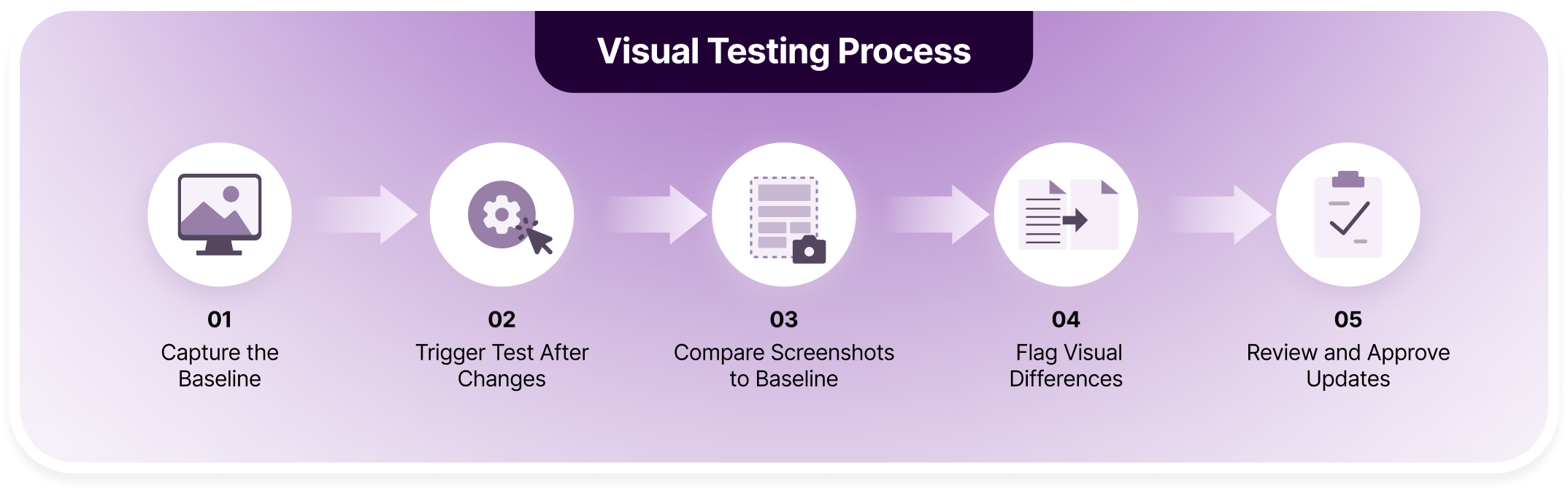
Step 1: Capture the Baseline: Screenshots are captured for key pages or components in their correct state across selected browsers and screen sizes. These images act as the trusted visual standard for all future test runs.
Step 2: Trigger Tests After Changes: Visual tests run automatically whenever code changes or a pull request is created. This ensures every UI update is visually validated before it moves further in the delivery pipeline.
Step 3: Compare Screenshots to Baseline: Fresh screenshots are matched against the approved baseline to spot visual differences such as layout shifts, spacing issues, styling errors, or missing UI elements across environments.
Step 4: Flag Visual Differences: Modern tools filter out irrelevant noise from dynamic content like animations or timestamps and highlight only real visual regressions, keeping results accurate and reviewable.
Step 5: Review and Approve Updates: Teams review side-by-side visual diffs to confirm intended changes or catch defects. Once approved, the baseline is updated so tests stay aligned as the interface evolves.
Visual Regressions Hurts You More Than Website Crashes
Top 20 Visual Testing Software For 2026
Visual testing tools vary widely in how they detect changes, manage baselines, and fit into modern development workflows. Some focus on component-level checks, others on full-page validation or CI-first automation. Below, we start with a tool that’s widely used for scalable, production-grade visual testing.
Top 20 Visual Testing Software
- Percy by BrowserStack: AI-powered visual testing on real browsers
- Applitools Eyes: AI-based visual comparisons at large scale
- VisualTest (SmartBear) – Script-driven visual validation with AI filtering
- Chromatic: Component-level visual testing via Storybook snapshots
- Reflect: Lightweight visual checkpoints inside automated tests
- GreenOnion: Customizable visual regression in automation pipelines
- BugBug: Simple visual monitoring and regression alerts
- Aye Spy: High-speed visual diffs using Selenium Grid
- Vizregress: Selenium-based visual regression for scripted tests
- Needle: Python-based visual regression with Selenium
- BackstopJS: Open-source pixel-based visual regression framework
- TestCafe: End-to-end testing with plugin-based visuals
- Selenium: Browser automation extended with visual libraries
- Appium: Mobile UI automation with visual comparisons
- Playwright: Screenshot-based visual checks in E2E tests
- Puppeteer: Scripted visual capture using headless Chrome
- Cypress: Plugin-driven visual testing inside E2E workflows
- Wraith: URL-based visual comparison across breakpoints
- Testplane (Hermione.js): JavaScript visual regression with WebdriverIO
- Galen Framework: Layout-focused visual validation using rules
1. Percy By BrowserStack
Percy is an advanced visual testing platform that incorporates AI workflows and real device infrastructure to bring super-fast, reliable visual testing and accuracy. Percy automates timely screenshots to capture layout shifts, styling regressions, and missing elements across pages and states.
Percy is designed to merge with most CI pipelines, so visual issues surface early rather than during late-stage QA. Percy is a sought-after tool for small and large teams where UI changes are frequent and manual visual reviews no longer scale. It combines automated screenshot capture with intelligent diffing to keep visual feedback fast and reviewable.
What Percy Does Best:
| Feature | What It Does | Impact on Teams |
|---|---|---|
| Visual AI Noise Suppression | Uses AI to ignore unimportant differences (such as animations and dynamic content) so only meaningful changes are flagged. | Cuts down on false positives and reduces unnecessary review work. |
| Cross-Browser & Responsive Testing | Runs visual comparisons across thousands of browsers, devices, and viewports. | Ensures consistent UI behavior across environments users actually use. |
| Seamless CI/CD Integration | Integrates easily with existing CI tools and test frameworks with minimal setup. | Makes visual testing part of regular build workflows, catching issues early. |
| Streamlined Review & Collaboration | Provides human-readable summaries, side-by-side diffs, comments, and team workflows. | Helps teams quickly understand and act on visual changes. |
| Snapshot Stabilization | Freezes animations and handles dynamic content during capture. | Produces repeatable, reliable snapshots to avoid flaky results. |
| Visual Scanner & Scheduled Monitoring | Scans URLs on demand or on a schedule to detect visual changes over time. | Helps catch regressions proactively in staging or production environments. |
| Localized Baselines per Branch | Maintains branch-specific baselines so parallel development doesn’t clash. | Supports feature branching and reduces merge conflicts in visual tests. |
Verdict:
- Teams releasing UI updates frequently, where functional tests pass but visual regressions still appear.
- Products with responsive designs, where layout issues surface only at certain breakpoints or screen sizes.
- Applications expand across multiple pages, components, and user flows, increasing visual coverage needs.
- Teams developing in parallel, where visual changes from different branches can overlap or conflict.
- Engineering teams that want visual checks to run automatically within CI instead of relying on manual QA steps.
- Products that need consistent UI behavior across browsers and environments before shipping.
Shipping is our heartbeat at Intercom. We ship over 200 times some days, and with Percy, we’ve been able to eliminate extra manual QA cycles and speed up deploy velocity while retaining full confidence in our UI.

Pricing: Percy offers a free plan that allows teams to get started with visual testing without upfront cost. Paid plans scale based on usage, parallelism, and coverage, making it easier to expand visual testing as the product grows. This pricing model works well for both small teams experimenting with visual testing and larger teams scaling it across projects.
2. Applitools Eyes
Applitools Eyes uses AI-driven visual comparisons to mimic human perception, reducing noise from minor differences while highlighting real UI changes. It supports web and mobile apps and integrates deeply with popular test frameworks.
Key Features of Applitools Eyes:
- AI-driven visual comparison that mimics human perception
- Large-scale cross-browser rendering via parallel execution
- Framework support across web, mobile, and desktop apps
- Advanced diff analysis with DOM and layout context
Verdict:
- Where it suits: Teams needing rapid reviews and insights, with ability to connect with existing testing frameworks.
- Where it doesn’t fit: No scope for teams requiring deeper AI comparisons. Have to compromise on absolute visual accuracy as there is no real device infrastructure for different screen sizes and viewports, across web and mobile applications.
Pricing: Starts at $969 per month, with higher tiers based on usage and enterprise options.
3. VisualTest (SmartBear)
VisualTest adds visual validation on top of automated tests, focusing on identifying meaningful UI changes while reducing noise.
Key Features of VisualTest:
- AI-assisted visual comparison
- Integration with existing test scripts
- Layout-aware diff detection
- Centralized test result tracking
Verdict:
- Where it suits: Works for teams already invested in scripted automation who want to layer visual checks without changing their testing stack.
- Where it doesn’t fit: Less suitable for teams looking for lightweight setup or modern visual-first workflows without scripting overhead.
Pricing: Offers a free trial, standard plan starts from $136 per month.
Percy is the ultimate UI workshop you are searching for
4. Chromatic
Chromatic generates visual snapshots directly from Storybook stories and compares them across branches. It is tightly coupled with component-driven development workflows.
Key Features of Chromatic:
- Automatic snapshot generation from Storybook stories
- Branch-based visual comparisons during pull requests
- Parallel rendering in a standardized environment
- Built-in visual review and approval workflow
Verdict:
- Where it suits: Fits teams treating UI components as the primary unit of development and review, especially when changes are isolated to design systems.
- Where it doesn’t fit: Falls short when teams need full-page testing, real browser coverage, or visual validation beyond Storybook-controlled components.
Pricing: Starts from $179 per month, with a free plan for up to 5000 screenshots.
5. Reflect
Reflect provides basic visual checkpoint comparisons as part of automated test runs, emphasizing simplicity.
Key Features of Reflect:
- Visual checkpoints during test execution
- Baseline comparison reporting
- Simple diff views
- CI integration
Verdict:
- Where it suits: Fits teams experimenting with visual testing who want minimal configuration and limited scope validation.
- Where it doesn’t fit: Does not scale well for complex UI surfaces or teams needing cross-browser and device coverage.
Pricing: Starts from $225 per month for unlimited test creations and up to 10 users. Free tier available.
6. GreenOnion
GreenOnion combines automation with visual comparison in customizable workflows.
Key Features of GreenOnion:
- Screenshot-based regression testing
- Scriptable automation flows
- CI/CD support
- Diff visualization
Verdict:
- Where it suits: Works in bespoke automation setups where flexibility is prioritized.
- Where it doesn’t fit: Less suitable for teams seeking polished review experiences and managed infrastructure.
Pricing: Open-source and free. Although, the overall cost of implementing visual testing with GreenOnion would be tied to the cost of your existing testing infrastructure.
7. BugBug
BugBug offers visual monitoring and regression detection with a low barrier to entry.
Key Features of BugBug:
- Automated visual checks
- Snapshot comparison
- Change alerts
- CI integration
Verdict:
- Where it suits: Fits teams wanting simple, ongoing visual monitoring without heavy setup.
- Where it doesn’t fit: Limited depth for complex applications or large-scale UI coverage.
Pricing: Pro plan starts from $189 per month, with unlimited users and cloud test runs. Also offers a 14-day free test trial.
Why settle for alternatives that do half the job?
8. Aye Spy
Aye Spy focuses on fast visual comparisons using Selenium Grid and parallel execution, often paired with cloud storage.
Key Features of Aye Spy:
- Parallel screenshot comparison
- Selenium Grid compatibility
- High-performance diffing
- External storage support
Verdict:
- Where it suits: Works in setups where Selenium infrastructure already exists and speed is prioritized over review experience.
- Where it doesn’t fit: Requires significant setup and offers limited visual review and collaboration compared to modern hosted platforms.
Pricing: Free and open source.
9. Vizregress
Vizregress adds visual comparison capabilities to Selenium-driven automation, focusing on regression detection rather than review experience.
Key Features of Vizregress:
- Selenium-based screenshot capture
- Image comparison utilities
- Baseline storage
- CI pipeline support
Verdict:
- Where it suits: Fits teams already committed to Selenium who want visual signals without adopting new tools.
- Where it doesn’t fit: Lacks noise suppression and visual context, leading to more manual investigation as coverage grows.
Pricing: Free and open source.
10. Needle
Needle is a Python-based visual regression tool built around Selenium. It stores baseline screenshots and compares future runs against them.
Key Features of Needle:
- Python and Selenium integration
- Screenshot-based baseline comparisons
- Configurable diff thresholds
- CI-friendly execution
Verdict:
- Where it suits: Fits Python teams already running Selenium tests and wanting basic visual coverage with minimal tooling changes.
- Where it doesn’t fit: Lacks the scalability and review tooling needed for larger teams or frequent UI changes across many environments.
Pricing: Free and open source.
11. BackstopJS
BackstopJS is an open-source visual regression framework that relies on scripted scenarios and pixel comparisons. It offers full control but requires manual setup and maintenance.
Key Features of BackstopJS:
- Scripted visual scenarios via configuration files
- Pixel-based screenshot comparison
- CLI-driven execution for CI environments
- HTML-based visual diff reports
Verdict:
- Where it suits: Fits teams comfortable maintaining their own infrastructure and scripts, and who value control over convenience.
- Where it doesn’t fit: Becomes harder to manage as visual coverage grows, especially without built-in noise handling or collaborative review workflows.
Pricing: Free and open source.
12. TestCafe
TestCafe is primarily an end-to-end testing framework, with visual checks added through plugins.
Key Features of TestCafe:
- End-to-end browser automation
- Screenshot capture via plugins
- Cross-browser execution
- CI-friendly test runs
Verdict:
- Where it suits: Works when visual validation is a secondary layer on top of functional tests already written in TestCafe.
- Where it doesn’t fit: Visual testing remains fragmented and manual compared to platforms designed specifically for visual workflows.
Pricing: Free and open source.
13. Selenium
Selenium enables visual testing through integrations rather than native features.
Key Features of Selenium:
- Cross-browser automation
- Screenshot capture APIs
- Plugin-based visual diffing
- Grid-based parallel execution
Verdict:
- Where it suits: Fits teams needing maximum flexibility and custom pipelines for visual checks.
- Where it doesn’t fit: Requires significant effort to achieve stable, scalable visual testing workflows.
Pricing: Free and open source tool. However, there are many visual testing software tools like Percy that enables Selenium integration to utilize selenium capabilities and expand on test coverage, real device infrastructure and cloud storage at an extra cost.
14. Appium
Appium supports visual validation through screenshots and third-party diff tools for mobile apps.
Key Features of Appium:
- Mobile automation across iOS and Android
- Screenshot capture during flows
- Integration with visual diff libraries
- CI/CD compatibility
Verdict:
- Where it suits: Works when mobile UI validation needs to be embedded directly into functional automation.
- Where it doesn’t fit: Visual analysis and review are fragmented compared to platforms built specifically for visual testing. Also this tool is primarily focused on mobile application testing, not best for visual web testing.
Pricing: Free and open source.
15. Playwright
Created and maintained by Microsoft, Playwright is an open-source E2E testing framework that includes native screenshot assertions for visual checks within end-to-end tests.
Key Features of Playwright:
- Screenshot comparison assertions
- Cross-browser execution
- Region-level snapshot control
- CI-friendly setup
Verdict:
- Where it suits: Works well when visual checks are lightweight and tied closely to functional test flows.
- Where it doesn’t fit: Lacks advanced visual review, collaboration, and cross-environment consistency controls.
Pricing: Free and open source.
16. Puppeteer
Puppeteer is a library for browser automation created by Google Chrome team, that allows teams to script visual comparisons by capturing screenshots programmatically.
Key Features of Puppeteer:
- Headless browser automation
- Screenshot generation
- Scripted comparison workflows
- CI integration
Verdict:
- Where it suits: Fits custom automation pipelines where teams want full control over visual capture logic.
- Where it doesn’t fit: Requires building and maintaining comparison and review tooling from scratch.
Pricing: Free and open source.
17. Cypress
Cypress supports visual testing through community plugins layered onto functional tests.
Key Features of Cypress:
- Screenshot capture
- Plugin-based visual diffs
- Interactive debugging
- Integration with CI pipelines
Verdict:
- Where it suits: Works when teams already rely heavily on Cypress for E2E testing.
- Where it doesn’t fit: Visual testing remains secondary and fragmented compared to dedicated visual platforms.
Pricing: Core is free, however you would need further plugins for visual accuracy, which may incur varied additional costs.
18. Wraith
Wraith is a screenshot comparison tool focused on URL-to-URL comparisons across breakpoints.
Key Features of Wraith:
- Automated screenshot capture
- Multi-resolution comparisons
- Simple diff generation
- Configuration-driven setup
Verdict:
- Where it suits: Fits quick checks across many pages and screen sizes.
- Where it doesn’t fit: Limited collaboration and maintenance tooling for ongoing visual regression programs.
Pricing: Free and open source.
19. Testplane (Hermione.js)
Testplane, formerly known as Hermione.js, is a Node.js-based testing framework that extends functional UI tests with screenshot comparison. It is often used alongside WebdriverIO and focuses on script-driven visual regression rather than managed visual workflows.
Key Features of TestPlane:
- Screenshot capture during functional test execution
- Image comparison against stored baselines
- Integration with WebdriverIO and Selenium
- CLI-driven execution suitable for CI pipelines
Verdict:
- Where it suits: Fits teams already using WebdriverIO or Selenium who want to layer visual checks directly into existing JavaScript-based test suites without introducing a separate platform.
- Where it doesn’t fit: Becomes harder to maintain as visual coverage grows, since baseline management, noise handling, and visual review remain largely manual compared to modern visual testing systems.
Pricing: Free and open source.
20. Galen Framework
Galen Framework focuses on layout validation using defined rules rather than pixel comparisons.
Key Features of Galen Framework:
- Layout specification language
- Responsive layout assertions
- Selenium integration
- Detailed layout reports
Verdict:
- Where it suits: Works where layout consistency matters more than visual styling precision.
- Where it doesn’t fit: Does not cover broader visual regressions like color, imagery, or subtle UI shifts.
Pricing: Free and open source.
Ready to Change Gears With Your Visual Testing Efforts?
Scale your tests with Percy’s real device infrastructure, integrate with your existing testing workflows

Visual Testing Software: Cutting-Edge Features to Look For in 2026
Visual testing tools are no longer judged only by whether they can compare screenshots. As UI complexity grows and release cycles shorten, teams now look for platforms that reduce noise, scale coverage, and fit naturally into everyday development workflows.
- AI-Assisted Visual Comparison: Modern tools are expected to distinguish between meaningful UI regressions and insignificant changes caused by dynamic content. For example, tools like Percy have active noise reduction, reducing false positives and keeping review effort focused on changes that actually impact users.
- Real Browser and Device Coverage: Visual differences often appear only on specific browsers, OS versions, or screen sizes. Tools that validate UI in real environments provide higher confidence than simulated or standardized renderers. There are tools such as Percy that offer real device infrastructure for improved visual accuracy.
- Branch-Aware Baselines and Parallel Development Support: With multiple features shipping at once, visual testing tools need to manage separate baselines per branch. This prevents unrelated visual changes from blocking reviews or overwriting expected updates. Tools like Percy incorporate separate baselines for each branch.
- CI-Native Workflows With Fast Feedback: Visual checks should run automatically with builds and pull requests. Faster feedback helps teams catch regressions while context is still fresh. As a result, tools like Percy works with major CI tools such as Jenkins, BambooCI and TeamCity.
- Scalable Snapshot Management: As applications grow, visual coverage expands across pages, components, and states. Tools such as Percy handle increasing snapshot volumes without slowing down builds or overwhelming reviewers.
- Clear Review and Approval Experience: Review interfaces should make it easy to understand what changed, why it matters, and whether it should be approved. This keeps visual testing collaborative rather than a bottleneck.
Percy Packs The Entire Visual Testing Toolkit
Conclusion
Visual testing has moved from being a manual, last-minute check to an essential part of modern quality assurance. As applications grow more visual and release cycles get tighter, relying on human review alone becomes both risky and unsustainable.
The tools covered in this guide reflect how visual testing is practiced today, ranging from script-driven open-source solutions to managed platforms designed for scale. The right choice depends on how often your UI changes, how many environments you support, and how closely visual checks need to fit into your development workflow.
FAQs
No, many visual testing tools are open source and free to use, especially those that rely on scripting and self-managed infrastructure.
However, managed platforms often offer paid plans in exchange for reduced setup, built-in review workflows, and broader browser or device coverage. Some platforms also provide free tiers, making it easier for teams to get started before scaling.
Common challenges include managing false positives, maintaining visual baselines, and scaling coverage as applications grow. Tools without noise handling or clear review workflows can increase review time instead of reducing it. Choosing software that fits your development pace and UI complexity is critical.
Visual testing software helps teams catch UI regressions that functional tests often miss, such as layout shifts, styling changes, or missing elements. It reduces reliance on manual visual checks and provides consistent validation across releases. Over time, this leads to fewer production UI issues and faster release cycles.
Related Articles

How Can Visual Diff Testing Improve Your UI Checks?
Understand visual diff testing, its benefits for UI testing, and how to automate visual comparisons ...

Top 6 Automated Visual Testing Tools for Selenium in 2026
Discover top automated visual testing tools for selenium integration. Choose among 2026’s top tool...

Visual Testing With Appium: 2026 Guide
Appium visual testing guide with setup steps, image comparison methods, limitations, and how to enha...