
How to Conduct Visual Diff Testing

How Can Visual Diff Testing Improve Your UI Checks?
As a tester, I kept seeing the same problem over and over again: visual bugs slipping through even after hours of manual visual testing.
No matter how much time I spent on manual UI checks, small visual issues kept seeping into releases. I would review screens again and again, zooming in, switching browsers, and still miss tiny layout shifts that showed up only after release.
Instead of being hard on myself, I realised that the solution would land me towards automated visual testing, particularly visual diff testing. Hundreds of small visual differences can be checked automatically, making it easier to spot what actually changed.
In this article, I’ll explain what visual diff testing is and how it improves UI checks. We’ll walk through how visual diff testing works step by step, compare it with manual testing, and see how tools like Percy make visual comparison tests easier to manage.
What is Visual Diff Testing?
Visual diff testing is a testing technique that compares screenshots taken before and after a UI change. The goal is to detect visual differences that were not intentionally introduced. Instead of guessing what might have changed, testers get a clear visual comparison.
Each screenshot captured becomes a visual reference, often called a baseline. When new changes are introduced, the latest screenshots are compared against this baseline. Any mismatch is flagged as a visual difference for review.
Visual diff testing focuses purely on appearance, not behavior. It helps catch issues like spacing shifts, font changes, missing elements, or broken layouts. These are problems that functional and UI automation tests usually overlook.
Manual comparisons don’t scale. Save time and costs with automated visual diff testing
How Does Visual Diff Testing Help You As a Tester?
Visual diff testing gives developers a clear way to validate UI changes without relying on manual reviews. By comparing screenshots automatically, it removes guesswork and helps confirm whether visual changes are expected or accidental.
Here’s why testers should rely on visual diff testing:
- Early Visual Feedback: Visual diffs surface UI changes as soon as code is pushed or a pull request is created. Developers can review visual differences immediately, reducing the chance of unintended UI issues reaching later testing stages.
- Clear Change Visibility: Side-by-side screenshot comparisons show exactly what changed and where. This clarity helps developers understand visual impact faster than reading test logs or relying on written bug reports.
- Faster Review Cycles: Visual evidence speeds up code reviews by removing subjective discussions about UI changes. Reviewers can quickly approve intended updates or request fixes with confidence.
- Safer UI Refactoring: Developers can refactor layouts or styles knowing that visual diff testing will catch unexpected changes. This encourages cleaner code without risking unnoticed UI regressions.
A Step-by-Step Guide to How Visual Diff Testing Works
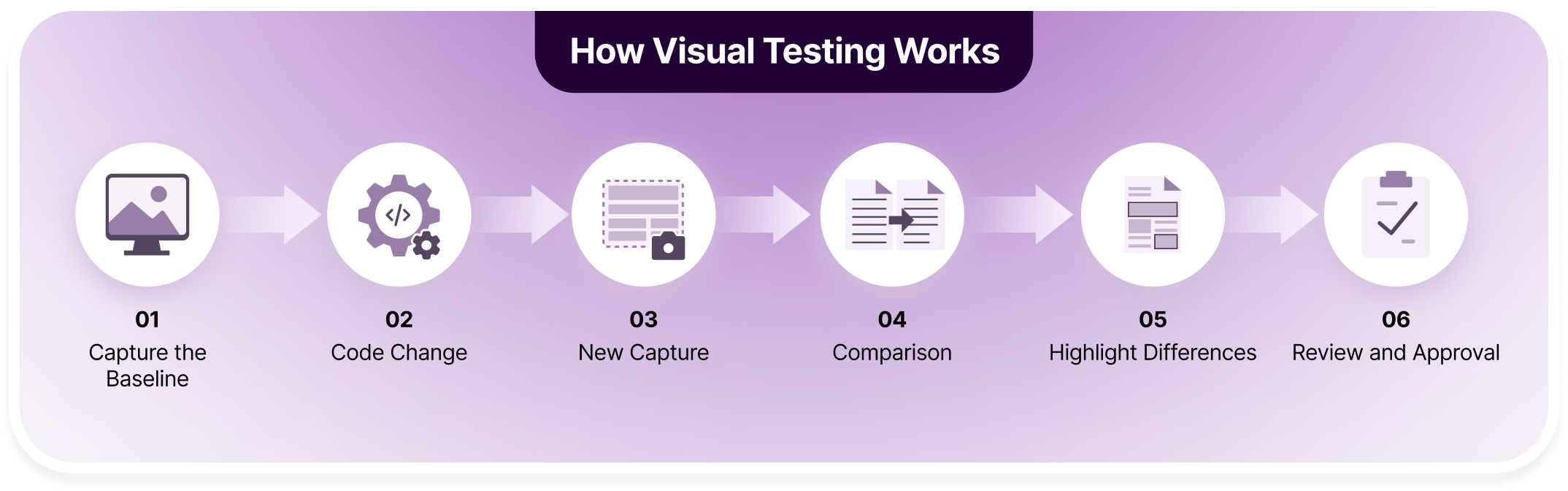
Visual diff testing focuses on capturing how the UI looks, comparing it after changes, and reviewing only what actually differs. This makes visual checks repeatable, reliable, and far less dependent on manual inspection. Let’s look at it in detail:
Step 1: Capture Baseline: The first step is capturing screenshots of the UI in its expected state. For example, a checkout page is saved after design approval. This becomes the visual reference for future comparisons.
Step 2: Code Change: A developer makes a UI-related change, such as updating button styles or adjusting spacing. These changes may look small in code but can affect how the page appears.
Step 3: New Capture: After the code change, new screenshots are captured automatically. These reflect how the updated UI looks in the same browser, device, and viewport conditions.
Step 4: Comparison: The tool compares the new screenshots against the baseline. It checks for visual differences instead of relying on functional assertions or DOM structure.
Step 5: Highlight Differences: Any detected changes are highlighted visually, such as a shifted button or missing icon. This makes it easy to spot even tiny UI differences at a glance.
Step 6: Review and Approval: Testers or developers review the highlighted changes. Intended updates are approved, while unintended ones are flagged and fixed before release.
Visual Diff Testing vs Manual Visual Testing: Core Differences
Manual visual testing relies heavily on human attention and repetition, which makes it slow and error-prone at scale. Visual diff testing replaces guesswork with consistent screenshot comparisons, helping teams catch UI changes more reliably. Although both needs to blend together to create the perfect visual efficiency, here’s how they differ:
| Aspect | Visual Diff Testing | Manual Visual Testing |
|---|---|---|
| Speed | Runs visual checks automatically within minutes during test execution, using automatic snapshot comparison | Normally a QA or tester is required to manually review each screen and interaction |
| Accuracy | Detects even subtle visual changes consistently, but is prone to false positives and visual noise depending on the tool used | Manual checks guarantee better judgement but has the risk of human oversight and fatigue |
| Scalability | Possible to scale across different applications, pages, browsers, and releases with minimal effort | Does not scale according to testing canvas, becomes harder to perform as application size and release frequency grow |
| Consistency | Applies the same comparison logic on every run | Results vary based on tester attention and experience |
| Coverage | Tests multiple browsers and viewports in parallel, tools like Percy even has branches for each testing conditions | Limited by available time and testing resources |
| Maintenance | Requires baseline updates but minimal repeated effort | Requires repeated manual checks for every release |
| Feedback Loop | Integrates into CI pipelines for early detection | Issues often found later in the release cycle |
| Collaboration | Provides visual diffs that are easy to review and share | Relies on screenshots, notes, or verbal explanations |
How Can Percy’s AI-Powered Visual Diff Testing Tool Help You?
BrowserStack Percy is a user-driven, advanced visual regression testing tool that provides efficient visual diff testing and beyond to bring the best testing results. Percy compares hundreds of screenshots instantly with its baseline and picks up all leakages in between. This is done bearing minimal false positives and ease of convenience for testers to review and approve.
Percy’s root cause analysis is one of my favorite features. It makes it easy for testers and developers to understand where things have gone wrong… it allows developers to focus on the exact fixes instead of just finding out where the issue is.

Percy incorporates AI workflows including AI reviews and snapshot stabilization to suppress visual noise and reduce flakiness. All of these features work on Percy’s extensive real device cloud, with over 50,000 real devices and browser accessibility, with integrations including CI/CD pipelines.
Here’s some key features that makes Percy the right choice for ultimate visual diff testing:
| Feature | What It Does | Impact on Teams |
|---|---|---|
| Visual AI Noise Suppression | Uses AI to ignore insignificant differences like animations or minor rendering changes. | Reduces false positives and keeps visual diffs focused on real UI issues. |
| Snapshot Stabilization | Freezes animations and normalizes dynamic content during screenshot capture. | Produces consistent, repeatable snapshots across test runs. |
| Cross-Browser & Responsive Rendering | Captures visuals across multiple browsers and viewport sizes. | Helps detect layout issues that appear only in specific environments. |
| CI/CD Integration | Runs visual diff tests automatically within CI pipelines. | Catches visual regressions early in the development cycle. |
| Parallel Build Support | Combines snapshots from parallel test runs into a single visual build. | Speeds up execution without fragmenting visual test results. |
| Branch-Level Baselines | Maintains separate baselines for feature branches and pull requests. | Prevents baseline conflicts during parallel development. |
| Visual Review Agent (AI-Powered) | Highlights high-impact changes and summarizes visual diffs. | Makes review faster and easier for developers and testers. |
Compare Screenshots Instantly, Drive Results Evidently

How to Perform Visual Diff Testing Using Percy
Getting started with visual diff testing in Percy is straightforward and fits naturally into existing test workflows. Percy works alongside your current test framework and CI setup, so visual checks run automatically whenever UI changes are introduced.
Once configured, Percy handles screenshot capture, comparison, and review without requiring manual intervention. The process stays consistent across builds, making visual diff testing reliable as projects scale.
- Integrate Percy with Your Test Framework: Install Percy and connect it to your existing framework, such as Selenium, Playwright, or Cypress. This allows Percy to capture screenshots during normal test execution.

- Capture Visual Snapshots: Add snapshot commands at key points, for example after a page loads or a component renders. These snapshots represent how the UI should look at that stage.
- Establish a Baseline: The first successful run creates a visual baseline. This approved state becomes the reference point for all future visual comparisons.
- Trigger Visual Diffs on Code Changes: When UI-related code changes are pushed, Percy captures new snapshots automatically. These are compared against the existing baseline during CI runs.
- Review Highlighted Differences: Percy highlights visual changes side by side, making it easy to see what changed. Intended updates can be approved, while unexpected ones are flagged for fixes.
- Approve or Reject Changes: Approved changes update the baseline for future runs. Rejected changes signal visual regressions that should be addressed before merging or release.

Conclusion
Visual diff testing brings clarity to UI checks that are otherwise difficult to scale manually. By comparing screenshots instead of relying on memory or repeated reviews, it helps catch subtle visual changes before they reach users. This makes UI validation more reliable and less dependent on human attention.
When paired with the right tooling, visual diff testing becomes even more effective. Platforms like Percy reduce noise, stabilize snapshots, and simplify reviews, allowing teams to focus on real UI changes. The result is faster feedback, fewer visual regressions, and greater confidence in every release.
FAQs
Changes caused by animations, dynamic content, timestamps, or third-party ads are usually not meaningful. These variations can create noise in visual diffs. Most tools allow stabilization or ignore rules to prevent false positives.
Baselines should be updated only when visual changes are intentional and approved. Frequent or automatic updates reduce the value of visual diff testing. A review step helps ensure baselines remain trustworthy over time.
Yes, visual diff testing can capture layout differences across multiple viewports and browsers. This makes it effective for detecting issues that appear only on specific screen sizes or environments. Proper coverage depends on the test setup.
Functional and UI automation tests verify behavior, not appearance. Visual diff testing complements them by catching layout and styling issues. Together, they provide more complete coverage of the user experience.
Related Articles

What is Visual Regression Testing [2026]
Visual regression testing detects unintended UI changes by comparing visual baselines. This article ...

Top 20 Visual Testing Tools for 2026
Explore the top 20 visual testing tools for 2026 and learn which platforms best catch UI regressions...
Automating Visual Tests in 2026 | How it Works
Learn how automated visual testing works in 2026, including baselines, screenshot comparison, and re...