
What is Visual Validation Testing?

What is Visual Validation Testing?
I once spent an entire afternoon fixing a UI bug that didn’t exist. Why?
Every time I run a test, everything passes and works perfectly, but sometimes there are issues that don’t fall into these tests. That might be a broken layout, overlapping banner, or some misaligned paragraphs. But regardless, they always get caught by the users, and they almost always lead to them dropping off from the website.
These issues are tricky to catch manually, because if you focus on accurately catching them, you spend too much time, and if you aim at completing them fast, you miss out on quite a few of these visual issues.
The answer is visual validation testing, a visual QA testing method that focuses on validating visual changes through screenshot comparisons. This article is focused on getting deeper into this subject, and helps you understand all there is to know under visual validation testing.
What is Visual Validation Testing?
Visual validation testing is a testing approach that checks whether an application’s UI looks correct by comparing it against an expected visual baseline. Rather than focusing on functionality, it verifies the appearance of pages and components exactly as users see them.
This visual comparison test reviews the current visual state of a page or component with an approved reference. If something shifts, overlaps, disappears, or renders differently than expected, the test flags it for review. This turns visual quality into something objective and testable.
Verify your website effortlessly with AI-powered visual testing tool
Importance of Visual Validation Testing
Visual validation testing helps teams maintain UI quality as applications grow more complex and change more frequently. It turns visual correctness into a repeatable, automated check rather than a manual guess. Additionally:
- Prevents UI Regressions: Visual diff testing identifies unintended visual changes such as layout shifts, broken styling, or missing UI elements before they reach staging or production environments.
- Protects User Experience: Ensures users consistently see clean, readable, and predictable interfaces, even when underlying code changes frequently across releases.
- Reduces Manual QA Overhead: Eliminates the need for repeated human visual inspections, saving significant QA time while reducing the risk of human error.
- Scales Across Browsers and Devices: Validates UI appearance across different browsers, operating systems, and screen sizes without requiring separate manual checks.
- Supports Faster Release Cycles: Catches visual bugs early in development, preventing last-minute fixes that can delay releases or introduce new bugs.
- Maintains Design Consistency: Keeps interfaces aligned with approved designs, style guides, and brand standards as teams iterate and ship updates.
How Do Visual Validation Tests Work?
Most visual testing tools follow a simple comparison-based workflow that turns UI appearance into something measurable and repeatable. Instead of relying on human observation, the process uses screenshots to detect visual differences automatically.
Here is a step-by-step walkthrough of how it works:
Step 1: Baseline Creation: A reference screenshot is captured from an approved UI state and stored as the visual baseline for future comparisons.
Step 2: UI Snapshot Capture: After code changes, new screenshots are taken under the same conditions, including browser, viewport, and device settings.
Step 3: Visual Comparison: The new snapshot is compared against the baseline to detect pixel-level, layout, or structural visual differences.

Step 4: Difference Highlighting: Any mismatches are clearly marked, making it easy to see where the UI has changed and how significant the change is.
Step 5: Review and Approval: Testers or developers review flagged differences and approve intended changes or reject unintended regressions.
Step 6: Baseline Update: Approved visual changes are saved as the new baseline, ensuring future comparisons remain accurate and relevant.
Automate Visual Checks in Seconds Using Percy

Who Are The Main Users of Visual Validation Testing?
 Many roles within the development and testing fraternity resort to visual testing software to address UI regressions from their specific perspective. These various users are:
- Frontend Developers: Developers use visual validation tests to catch unintended UI changes early in production while refactoring components or shipping new features.
- QA and Test Engineers: QA teams rely on visual validation to automate repetitive UI checks and reduce manual visual inspection during regression cycles.
- Design and UX Teams: Design team is responsible to validate that implemented interfaces match approved designs, spacing, typography, and brand guidelines before each release.
- Product Managers: Product managers verify the final UI output using visual validation tests to gain confidence that visual changes align with user expectations and business requirements across environments.
- DevOps and Release Teams: DevOps integrates visual validation into CI/CD pipelines to prevent visual regressions from reaching production, and to bring regular checkpoints of error-free software.
- Accessibility Specialists: Accessibility engineers use visual checks to spot contrast, visibility, and layout issues that can impact usability and inclusivity.
When Should You Perform Visual Validation Tests?
Visual validation testing is most effective when it’s applied at the right moments in the development lifecycle. These checkpoints help catch visual issues early, before they become costly or visible to users.
Here are checkpoints where visual validation tests become the most impactful:
- After UI or Styling Changes: Run visual validation tests whenever CSS, layout, typography, or component styling is updated to ensure no unintended visual regressions are introduced.
- Before Merging Code Changes: Validate visuals during pull request reviews to confirm that new changes don’t break existing pages or shared components.
- Before Major Releases: Perform visual checks before production releases to catch last-minute layout issues that functional tests might miss.
- During Cross-Browser Testing: Use visual validation when testing across browsers and devices to ensure consistent rendering in real user environments.
- After Design System Updates: Re-validate UI whenever design tokens, themes, or shared components are updated across the application.
- On Dynamic or Content-Heavy Pages: Apply visual validation to pages with frequent content updates where layout shifts are more likely to occur unnoticed.
Don’t let UI regressions go into production unnoticed. Use Percy to automate visual validation tests
Types of Visual Validation Testing
Visual validation testing can be implemented in different ways, depending on how visual differences are detected and compared. Each approach offers a different balance of accuracy, flexibility, and maintenance effort.
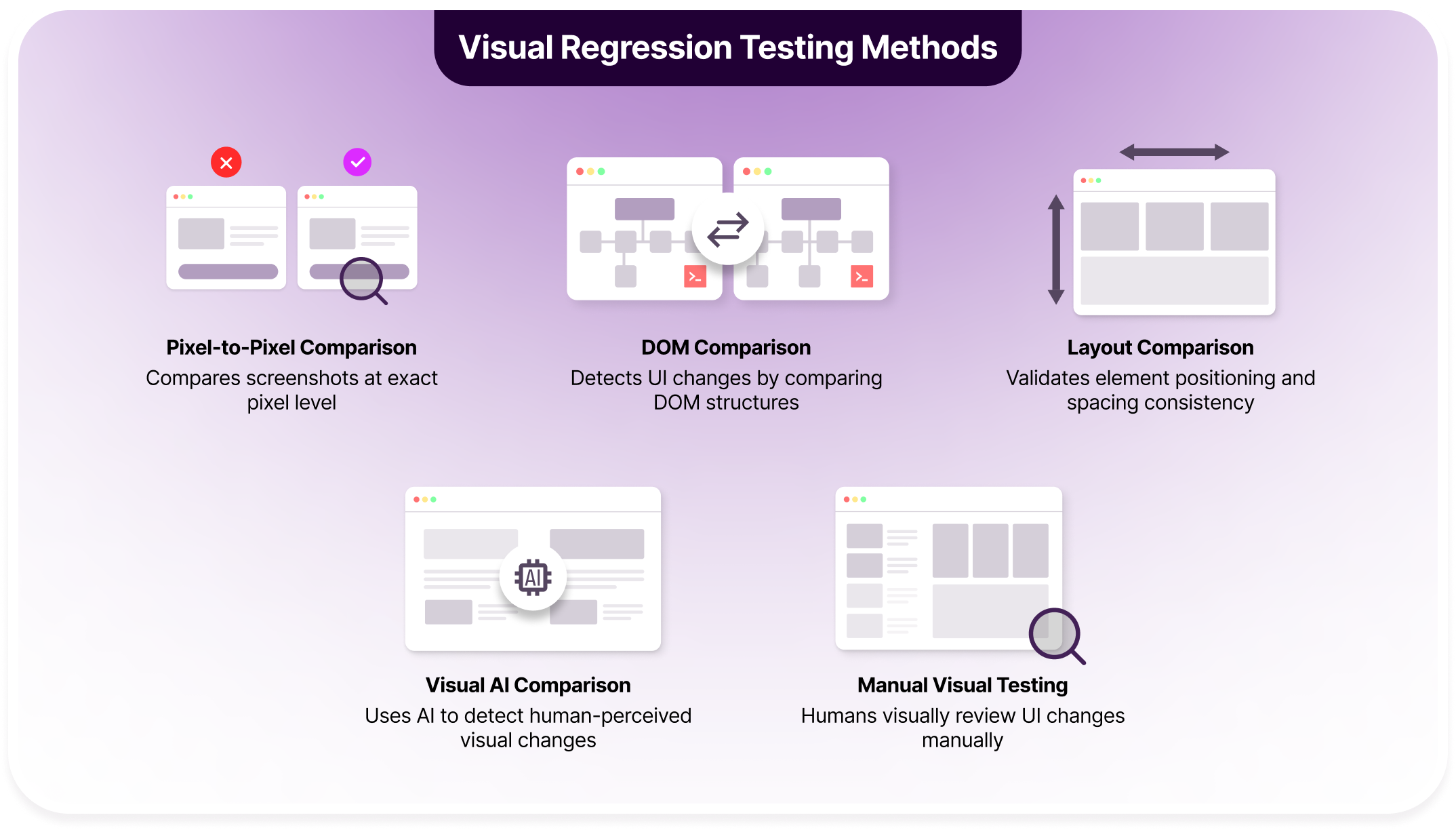
1. Pixel-by-Pixel Comparison
Pixel-based comparison checks screenshots at the individual pixel level. Any change in color, position, or rendering is flagged as a difference.
Because it is extremely sensitive, even minor variations like font smoothing, browser rendering updates, timestamps, or dynamic data can trigger failures. Without heavy masking, this method often produces excessive noise in real-world applications.
Best suited for:
- Static or tightly controlled UI states
- Pages with minimal dynamic content
- Highly controlled visual environments
2. DOM-Based Comparison
DOM-based comparison analyzes the underlying HTML structure rather than rendered pixels. It detects changes in elements, attributes, classes, or component hierarchy.
This approach is useful for identifying structural regressions but does not capture visual styling differences. Changes in color, spacing, or visual alignment may go unnoticed if the DOM structure remains intact.
Best suited for:
- Missing or altered attributes
- Component wrapper changes
- Accessibility-related structural updates
3. Layout Comparison
Layout comparison focuses on spatial relationships between elements by analyzing size, position, and alignment. It detects shifts in spacing, overlapping components, or broken grid structures.
While effective for layout integrity, it does not inspect internal content. Text changes, color differences, icons, or font rendering issues are typically ignored.
Best suited for:
- Responsive design validation
- Cross-browser layout consistency
- Large-scale CSS or layout refactoring
4. Visual AI Comparison
Visual AI comparison uses perceptual models to evaluate screenshots similarly to how humans perceive changes. It filters out insignificant differences while highlighting visually meaningful issues.
This approach significantly reduces false positives in modern applications. It handles dynamic content, animations, and minor rendering variations without extensive manual configuration.
Best suited for:
- Applications with frequent UI updates
- Dynamic dashboards and data-driven pages
- Scalable visual validation across teams
5. Manual Visual Testing
Every visual validation workflow still relies on human judgment at the final stage. Automated visual testing surface differences, but testers and designers interpret context, intent, and user impact before approving or rejecting changes.
Manual review alone does not scale for modern release cycles, but it remains critical as a decision layer. Automation reduces repetitive inspection, while humans handle edge cases, subjective design changes, and visually ambiguous results that tools cannot reliably classify.
Best suited for:
- Final approval of visual changes
- Resolving unclear or borderline visual diffs
- Complementing automated visual validation
Main Component Checks For Each Visual Validation Test
Users who run visual validation tests typically focus on specific UI components rather than entire pages in isolation. Modern interfaces are built from reusable visual elements, and validating these components helps detect regressions, rendering issues, and layout inconsistencies across browsers, devices, and screen sizes.
1. Visual Regression Testing: Visual regression testing checks whether existing UI components change unexpectedly after code updates or releases. Every time there is an update, there is a routine comparison check to ensure that there are no visual regressions across all components.
These checks primarily evaluate:
- Buttons, forms, and interactive elements
- Typography, colors, and spacing consistency
- Icons, images, and visual assets
- Shared components across pages and flows
2. Cross-Browser Testing: Cross-browser testing ensures that the UI renders consistently across different browsers and operating systems. Oftentimes, the same page can be rendered differently on each browser. Tools like BrowserStack Percy incorporate a real device cloud to test UI regressions across different browsers and devices.
These checks primarily evaluate:
- Layout alignment across browsers
- Font rendering and text spacing differences
- CSS support and fallback behavior
- Browser-specific visual inconsistencies
3. Responsive Design Testing: Responsive design testing validates that the UI adapts correctly across screen sizes and device orientations. For example, your page would work as expected on an iPhone 17 pro but have issues with overlapping text or layout when it comes to a Samsung S25 Ultra.
These checks primarily include:
- Component resizing and reflow behavior
- Navigation menus and responsive grids
- Text wrapping and content visibility
- Breakpoint-specific layout issues
4. Visual Accessibility Testing: Accessibility testing ensures that visual elements adhere to usability and readability standards for all users. Issues are flagged when a component does not align with proper visibility checks.
These checks primarily include:
- Color contrast and text visibility
- Focus states and visual indicators
- Readability of labels and form inputs
- Visibility of error messages and alerts
5. Localization Testing: Localization testing verifies that translated content fits and displays correctly across languages. It ensures visual consistency is maintained regardless of language direction, character set, or regional formatting differences.
These checks primarily include:
- Text expansion or truncation issues
- Alignment changes caused by longer strings
- Font support for different scripts
- Layout stability across localized versions
Percy: Your All-in-One Visual Testing Toolkit
Use AI-powered visual automation and testing agents to unlock visual accuracy across all platforms, in no time!
Why Choose Percy As Your All-in-One Visual Validation Tool?
Most visual validation setups start simple but become difficult to manage as applications grow. Open-source visual regression testing tools often require teams to maintain browsers, manage baselines, handle flaky diffs, and build custom review workflows. Over time, this overhead makes visual testing harder to trust and easier to skip.
BrowserStack Percy is an advanced AI-powered testing tool that offers a complete visual validation workflow. Beyond just highlighting visual regressions, it does intelligent comparisons to segregate real regressions from visual noise, stabilizes screenshots for even comparisons, and supports most existing testing frameworks for easy integration.
Additionally, Percy hosts the biggest real device cloud infrastructure with over 50,000+ devices across web and mobile, allowing you to run validation tests in numerous device and browser combinations.
You can start working on Percy for free as their free plan offers up to 5000 screenshots per month, unlimited team members, and unlimited projects.
Here are some key features why over 50,000 users trust Percy for their visual validation:
| Feature | What It Does | Impact on Teams |
|---|---|---|
| AI-Powered Visual Reviews | Uses perceptual AI to ignore insignificant visual noise and highlight meaningful UI changes. | Reduces false positives and speeds up visual review cycles. |
| Snapshot Stabilization | Freezes animations and handles dynamic content during screenshot capture. | Produces consistent, repeatable snapshots without manual masking. |
| Cross-Browser & Responsive Coverage | Runs visual validation across real browsers, devices, and viewports. | Ensures UI consistency across environments users actually experience. |
| CI/CD Integration | Integrates with popular CI tools and test frameworks with minimal configuration. | Makes visual validation a natural part of every build and pull request. |
| Branch-Level Baselines | Maintains separate baselines for different branches and feature work. | Prevents baseline conflicts during parallel development. |
| Side-by-Side Visual Diffs | Displays before-and-after screenshots with clear highlighted differences. | Makes visual changes easy to understand and approve quickly. |
| Team Collaboration Workflow | Supports comments, approvals, and shared review context. | Aligns developers, testers, and designers on visual decisions. |
Unlock Percy Automation for Free
How to Perform Visual Validation Testing with Percy
Visual validation testing with Percy follows a simple, step-by-step workflow that fits naturally into existing development and testing processes.
Step 1: Integrate Percy Into Your Test Setup: Add Percy to your existing test framework such as Selenium, Cypress, Playwright, or WebdriverIO. Minimal configuration is required to start capturing visual snapshots.
Step 2: Define Visual Checkpoints: Insert snapshot commands at key points in your tests, such as after page loads, form submissions, or UI state changes you want to validate.
Step 3: Capture Baseline Snapshots: Run the tests for the first time to create approved visual baselines. These baselines represent the expected appearance of your UI.
Step 4: Make UI or Code Changes: Update styles, components, or layouts as part of normal development. Percy automatically captures new snapshots during test runs.
Step 5: Review Visual Differences: Percy compares new snapshots against the baseline and highlights meaningful visual changes in a clear, side-by-side view.

Step 6: Approve or Reject Changes: Approve expected visual updates to update the baseline or reject unintended changes to flag visual regressions.
Step 7: Automate Across CI/CD Pipelines: Run visual validation automatically on every pull request or build to catch visual issues early and consistently.
Conclusion
Visual validation testing fills a critical gap left by functional and traditional UI tests. It ensures that what users see on the screen matches design intent, brand standards, and usability expectations, even as applications change rapidly.
By combining automated comparison with human review, visual validation turns UI quality into a reliable, scalable process. Tools like Percy make this easier by reducing noise, simplifying reviews, and integrating visual checks directly into everyday development workflows.
Related Articles

What is Visual Regression Testing [2026]
Visual regression testing detects unintended UI changes by comparing visual baselines. This article ...

Top 20 Visual Testing Tools for 2026
Explore the top 20 visual testing tools for 2026 and learn which platforms best catch UI regressions...
Automating Visual Tests in 2026 | How it Works
Learn how automated visual testing works in 2026, including baselines, screenshot comparison, and re...