
10 Best App Visual Testing Tools

10 Best App Visual Testing Tools in 2026
Over 6.8 billion people use smartphones globally. There are about 60-90 apps installed on average in a smartphone.
So it’s safe to say that your app has the potential to reach across the globe and scale towards millions of users.
But a small visual bug can immediately trigger your users to even uninstall your app. This is why visual testing not only extends to web applications but also native apps for iOS and Android.
In this article, we’re uncovering some of the most popular app visual testing tools you can use to conduct automated visual testing to catch many UI regressions at once.
What is App Visual Testing?
App visual testing is a software quality assurance process that verifies the user interface (UI) of a web or mobile application to ensure it appears as intended across various devices, operating systems, and screen sizes. It focuses on validating visual elements such as layout structure, typography, spacing, and component alignment to maintain design consistency.
At its core, app visual testing relies on a visual comparison test, where current screens are compared against approved baseline images to detect unintended changes. This applies to both native applications and mobile web visual testing, where responsive layouts must render correctly across browsers and devices. By identifying visual regressions early, teams can protect user experience before release.
How App Visual Testing Works
App visual testing follows a structured process to detect unintended UI changes before release.
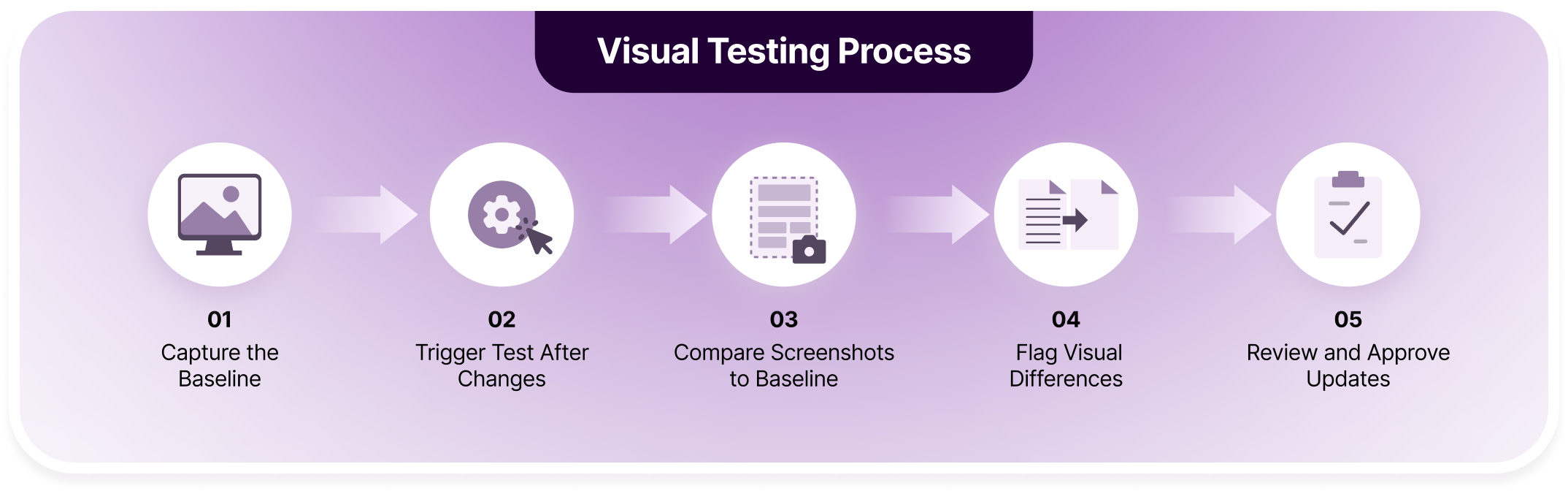
Below is a step-by-step breakdown aligned with the visual testing workflow:
1. Capture the Baseline
The first step is to capture baseline screenshots of the application. These images represent the approved visual state of each screen or component.
Baselines are usually created after a stable release or design sign-off. They serve as the reference point for all future visual comparison tests.
2. Trigger Test After Changes
When new code is committed or a build is generated, automated tests are triggered. These tests run as part of the CI/CD pipeline or scheduled testing process.
Any UI modification, whether intentional or accidental, becomes part of the new test cycle. This ensures visual validation happens consistently after updates.
3. Compare Screenshots to Baseline
The system captures new screenshots of the updated app and performs a visual comparison test against the stored baseline images.
Depending on the tool, comparison may use pixel matching or AI-based structural analysis. The goal is to detect differences in layout, spacing, fonts, images, and other UI elements.
4. Flag Visual Differences
If the system detects discrepancies, it highlights the exact areas where changes occurred. These differences may include layout shifts, missing components, color changes, or distorted elements.
Modern tools reduce noise by filtering dynamic content such as timestamps or animations. This keeps results focused on meaningful UI changes.
5. Review and Approve Updates
Teams review flagged differences through a dashboard or report. If the change is intentional, the new screenshot becomes the updated baseline.
If the change is unintended, the issue is logged and fixed before release. This approval workflow ensures visual consistency while allowing controlled design evolution.
It takes less than a second for your users to catch issues on your app. It only takes slightly more to sign up with App Percy.
Benefits of App Visual Testing
As mobile apps grow more dynamic and updates become more frequent, relying only on manual review increases risk. Automated visual validation strengthens quality control while supporting faster development cycles.
Below are the key benefits of implementing app visual testing:
- Early Detection of UI Regressions: Visual testing identifies unintended UI changes immediately after code updates. This prevents layout issues, broken components, or styling inconsistencies from reaching production. Catching problems early reduces debugging time and release delays.
- Improved Cross-Device Consistency: Mobile apps must render correctly across various screen sizes and OS versions. Visual testing ensures that layouts, spacing, and visual hierarchy remain consistent across Android and iOS devices. This protects brand perception and usability.
- Reduced Manual Testing Effort: Manually reviewing screens after every update is time-consuming and error-prone. Automated visual comparison tests perform this validation quickly and consistently. QA teams can focus on higher-value exploratory testing instead.
- Faster Release Cycles: Because visual tests run automatically in CI/CD pipelines, teams receive immediate feedback on UI changes. This enables rapid iteration without compromising design quality. Faster feedback loops support continuous delivery practices.
- Better Collaboration Between Teams: Visual diff dashboards provide a clear view of what changed. Designers, developers, and QA engineers can review updates together and approve intentional changes. This reduces miscommunication and streamlines decision-making.
- Stronger User Experience Protection: Users often notice visual defects before functional issues. Maintaining polished, consistent screens increases trust and reduces app uninstall rates. Visual testing acts as a safeguard for overall user satisfaction.
- Scalable Quality Assurance: As apps grow in complexity, the number of screens and device combinations increases. Visual testing scales across builds and environments without multiplying manual workload. This makes it suitable for both startups and enterprise teams.
10 Best App Visual Testing Tools in 2026
The tools in this list were selected based on their relevance to app visual testing, tools that reduce false positives through intelligent diffing, support Android and iOS validation, and integrate seamlessly with automation frameworks.
Both enterprise-grade solutions and flexible open-source options are included to cover different team sizes and technical needs.
10 Best App Visual Testing Tools in 2026:
- BrowserStack App Percy: AI-powered mobile visual testing on real device cloud.
- Applitools Eyes: Enterprise visual AI with scalable cross-browser testing.
- Appium: Cross-platform automation extended for mobile visual validation.
- Testplane: Scenario-based visual regression for responsive applications.
- Galen Framework: Rule-based layout validation for responsive web apps.
- Aye Spy: Lightweight screenshot comparison for frontend UI changes.
- BackstopJS: Structured visual regression testing for modern web interfaces.
- Chromatic: Component-level visual testing for Storybook-driven workflows.
- iOSSnapshotTestCase: Native iOS snapshot testing within Xcode environments.
- Visual Regression Tracker: Centralized dashboard for managing visual diffs.
1. BrowserStack App Percy
BrowserStack App Percy is an AI-powered visual regression testing platform designed specifically for native and hybrid mobile applications. It captures snapshots during automated test runs and compares them against approved baselines to detect unintended UI changes across Android and iOS devices.
App Percy stands out because it runs on BrowserStack’s real device cloud, ensuring screenshots reflect real-world rendering conditions. Its AI-driven visual review engine reduces false positives by focusing on meaningful UI differences.
Here’s more on App Percy’s distinct core features:
| Feature | Description | Impact |
|---|---|---|
| Real Device Cloud Testing | Captures screenshots on real Android and iOS devices hosted in BrowserStack’s cloud infrastructure, covering multiple OS versions and screen sizes. | Ensures accurate rendering validation under real user conditions. |
| AI-Powered Visual Diffing | Uses intelligent algorithms to detect meaningful visual changes instead of flagging minor rendering variations or pixel noise. | Reduces false positives and shortens review cycles. |
| Snapshot Stabilization | Automatically stabilizes dynamic UI elements such as animations, timestamps, and loading states during screenshot capture. | Prevents flaky visual tests and improves consistency. |
| Automated Baseline Management | Stores and manages approved baseline images across builds and branches with structured approval workflows. | Maintains version control and traceability of UI changes. |
| CI/CD Integration | Integrates with Jenkins, GitHub Actions, GitLab CI, and other pipelines for automated visual validation after every build. | Enables continuous visual testing without slowing releases. |
| Parallel Test Execution | Executes visual tests simultaneously across multiple devices and configurations using scalable cloud infrastructure. | Accelerates feedback and reduces testing time. |
| Framework Compatibility | Supports integration with Appium, Selenium, Playwright, Cypress, and other automation frameworks. | Allows teams to extend existing functional tests with visual validation. |
| Centralized Review Dashboard | Provides a unified interface for reviewing visual diffs, approving updates, and tracking UI changes across builds. | Improves collaboration between QA, developers, and designers. |
| Branch-Based Baseline Control | Maintains separate baselines for feature branches and main builds to prevent conflicts during development. | Enables safe experimentation without disrupting production baselines. |
| Detailed Visual History Tracking | Maintains build history and visual change logs across releases for auditing and debugging. | Enhances governance and long-term UI quality management. |
BrowserStack App Percy Pricing
- Free Plan: $0
- Essentials Plan: $199 per month (billed annually)
- Device Cloud Plan: Starts at $399 per month (billed annually)
- Enterprise Plan: Custom Pricing
Switch to 10x faster mobile visual automation
App Percy leverages the biggest real device infrastructure to parallel test your mobile application across 30,000+ devices

2. Applitools Eyes
Applitools Eyes is a visual testing software that validates UI across web and mobile applications. The platform integrates with popular automation frameworks and supports cross-browser and cross-device rendering validation. It is widely adopted by enterprise teams seeking scalable visual regression testing with intelligent diffing capabilities.
Key Features of Applitools Eyes:
- Visual AI Comparison Engine: Uses AI to analyze layout structure and detect meaningful UI changes beyond raw pixel differences.
- Ultrafast Grid Execution: Executes visual tests across multiple browsers and devices in parallel using cloud-based rendering infrastructure.
- Flexible Match Levels: Provides strict, layout, and content match modes to adjust comparison sensitivity based on testing needs.
- Comprehensive Framework Integrations: Integrates with Selenium, Appium, Cypress, Playwright, and other major automation frameworks.
Limitations of Applitools Eyes:
- No Native Real Device Cloud: Does not provide built-in real mobile device testing like BrowserStack App Percy without additional infrastructure configuration.
- Enterprise-Oriented Pricing: Pricing is typically custom and may be a more expensive option for small teams or startups.
- Complex Initial Setup: Advanced configuration and onboarding may require dedicated implementation effort.
- High Resource Consumption at Scale: Large visual test suites may require significant cloud execution capacity.
- Dependency on Cloud Rendering Infrastructure: Visual validation relies heavily on Ultrafast Grid for broad environment coverage.
Applitools Eyes Pricing
- Free Trial: 14 days
- Starter Plan: Custom pricing (entry-level team plan)
- Enterprise Plan: Custom pricing based on usage and scale
3. Appium
Appium is an open-source mobile automation framework used for testing native, hybrid, and mobile web applications across Android and iOS. While primarily designed for functional testing, Appium supports visual validation through automated screenshot capture and integration with image comparison tools.
It allows teams to extend existing mobile automation scripts with visual regression checks without switching frameworks. Appium is widely adopted due to its cross-platform flexibility and language support.
Key Features of Appium:
- Cross-Platform Mobile Automation: Supports Android and iOS testing using a unified WebDriver-based API across multiple programming languages.
- Screenshot Capture Capability: Enables automated screenshot capture during test execution for visual regression comparisons.
- Real Device and Emulator Support: Runs tests on physical devices and emulators when connected to device farms or cloud providers.
- Extensive Language Support: Compatible with Java, Python, JavaScript, Ruby, and other popular programming languages.
Limitations of Appium:
- No Built-In Visual Diff Engine: Requires third-party tools for image comparison and intelligent visual regression analysis.
- No Native AI-Based Comparison: Does not provide AI-driven filtering or semantic layout recognition capabilities.
- Manual Baseline Management: Teams must store and manage baseline screenshots independently without structured approval workflows.
- Infrastructure Maintenance Overhead: Requires setup and maintenance of device labs or cloud integrations for scalable execution.
- Limited Centralized Visual Dashboard: Does not include a built-in interface for reviewing and approving visual changes.
Appium Pricing
- Free (Open-source)
4. Testplane
Testplane is an open-source visual regression testing framework designed for validating web and responsive applications. It allows teams to define scenarios, capture screenshots, and compare them against baselines to detect UI changes.
Testplane is typically used in frontend workflows where teams want automated visual checks integrated into CI pipelines. While it focuses on pixel-based comparison, it can be extended with additional tooling for broader visual validation workflows.
Key Features of Testplane:
- Scenario-Based Screenshot Testing: Defines structured test scenarios to capture consistent screenshots across pages and application states.
- Configurable Image Comparison Thresholds: Supports adjustable tolerance levels to reduce minor rendering noise during visual comparisons.
- CI/CD Pipeline Integration: Easily integrates with continuous integration systems for automated visual regression checks.
- Responsive Layout Validation: Validates UI rendering across different screen sizes for responsive web applications.
Limitations of Testplane:
- No Native AI-Based Diffing: Relies on pixel comparison without semantic layout understanding or intelligent filtering.
- No Real Device Cloud Support: Does not provide built-in access to real mobile devices for rendering validation.
- Manual Baseline Governance: Requires teams to manage baseline images without structured approval workflows.
- No Centralized Visual Review Dashboard: Lacks a built-in interface for collaborative diff review and change approvals.
- Limited Native Mobile App Coverage: Primarily focused on web applications rather than native Android or iOS apps.
Testplane Pricing
- Free (Open-source)
5. Galen Framework
Galen Framework is an open-source layout testing framework designed to validate responsive design across different screen sizes.
Instead of traditional screenshot comparison, Galen focuses on layout specifications written in a custom syntax to verify positioning, alignment, and size relationships between UI elements.
Key Features of Galen Framework:
- Specification-Based Layout Testing: Validates UI alignment, spacing, and element positioning using human-readable layout specifications.
- Responsive Design Validation: Tests layouts across multiple screen resolutions to ensure consistent responsive behavior.
- Selenium Integration Support: Integrates with Selenium for automated test execution within existing workflows.
- Detailed Layout Reporting: Generates structured reports highlighting layout rule violations and alignment inconsistencies.
Limitations of Galen Framework:
- Testing Inaccuracy: It doesn’t easily catch subtle visual bugs like incorrect colors or font rendering differences across browsers.
- No AI-Powered Diffing: Does not use artificial intelligence for detecting meaningful visual changes.
- No Integrated Development Environment (IDE): Lack of a dedicated editor makes writing and debugging specs more tedious.
- No Centralized Visual Dashboard: Lacks a collaborative interface for reviewing visual changes visually.
- Limited Native Mobile App Support: Primarily suited for responsive web layouts rather than native applications.
Galen Framework
- Free (Open Source)
6. Aye Spy
Aye Spy is a visual regression testing tool that captures UI states and compares them against stored baselines to detect visual changes between builds. Aye Spy is commonly used in frontend workflows where teams want simple, automated visual validation integrated into CI pipelines. It focuses on straightforward image diffing rather than advanced AI-based visual intelligence.
Key Features of Aye Spy:
- Automated Screenshot Capture: Captures screenshots during automated test runs to compare against previously approved baseline images.
- Configurable Image Diff Thresholds: Allows adjustment of comparison sensitivity to reduce failures from minor rendering variations.
- CI Pipeline Integration: Integrates with continuous integration systems for automated visual regression validation.
- Simple Setup and Configuration: Lightweight implementation suitable for small projects and frontend teams.
Limitations of Aye Spy:
- No AI-Based Visual Intelligence: Uses pixel comparison without semantic understanding of layout or UI structure.
- No Real Device Testing Support: Does not provide built-in access to Android or iOS real devices.
- Requires External Infrastructure: Aye Spy requires integration with an external Selenium Grid for testing mobile devices in parallel.
- Manual Baseline Management: Requires manual storage and updating of baseline screenshots.
- No Centralized Review Dashboard: Lacks a collaborative interface for reviewing and approving visual changes.
Aye Spy Pricing
- Free (Open Source)
It takes less than a second for your users to catch issues on your app. It only takes slightly more to sign up with App Percy.
7. BackstopJS
BackstopJS is a visual regression testing framework designed to detect UI changes through automated screenshot comparisons. It allows teams to define testing scenarios, capture page states, and compare them against approved baselines.
BackstopJS is especially useful for frontend teams managing responsive layouts and design systems. It provides structured visual validation without requiring complex infrastructure.
Key Features of BackstopJS:
- Scenario-Based Visual Testing: Defines user flows and screen states to ensure consistent screenshot capture across builds.
- Responsive Layout Validation: Validates UI across multiple viewport sizes for responsive design consistency.
- Configurable Image Comparison Engine: Allows threshold tuning to control sensitivity of visual diff detection.
- CI/CD Workflow Integration: Integrates into automated pipelines for continuous visual regression testing.
Limitations of BackstopJS:
- No AI-Powered Semantic Diffing: Relies on pixel comparison without layout intelligence or advanced noise filtering.
- No Real Device Cloud Support: Does not provide native access to Android or iOS real devices like BrowserStack App Percy.
- Manual Baseline Governance: Baseline images must be stored and updated without structured approval workflows.
- Inefficient With Dynamic Content: BackstopJS works better with static visual content and struggles to perform visual tests on animated elements and data.
- Scalability Depends on Infrastructure: Parallel execution and scale require external CI and browser management.
BackstopJS Pricing
- Free to Use
8. Chromatic
Chromatic is a visual testing and UI review platform built specifically for Storybook-driven component workflows. It automatically captures UI component snapshots and highlights visual changes before code is merged.
Key Features of Chromatic:
- Component-Level Visual Testing: Automatically snapshots Storybook components and detects visual changes across builds.
- Structured Visual Review Workflow: Provides pull request-based approvals for managing UI updates collaboratively.
- UI Change Grouping: Groups related component changes together to simplify review and reduce noise.
- Seamless Storybook Integration: Integrates directly with Storybook projects without requiring additional automation setup.
Limitations of Chromatic:
- Limited to Component Scope: Focuses on individual UI components rather than full application screens or flows.
- Not Built for Native Mobile Apps: Primarily designed for web and design system testing, not Android or iOS apps.
- Dependent on Storybook Adoption: Requires Storybook-based architecture to deliver full value.
- Less Suitable for End-to-End UI Flows: Does not validate multi-screen navigation or user journeys.
Chromatic Pricing
- Free Plan: $0 (limited builds and snapshots)
- Pro Plan: Starts at $149 per month
- Business Plan: Custom Pricing
9. iOSSnapshotTestCase
iOSSnapshotTestCase is a snapshot-based visual testing library designed specifically for iOS applications. It enables developers to capture reference images of UI components and compare them against future builds to detect visual changes.
The tool integrates directly into Xcode test suites, making it useful for teams that want lightweight visual validation within native iOS development workflows.
Key Features of iOSSnapshotTestCase
- Native iOS Snapshot Testing: Captures UIView and UIViewController renderings directly within XCTest-based test suites.
- High-Precision Pixel Comparison: Performs pixel-level image comparison to detect even small UI rendering changes.
- Seamless Xcode Integration: Runs inside standard iOS testing workflows without requiring external infrastructure.
- Fast Local Execution: Executes snapshot tests quickly on simulators during development cycles.
Limitations of iOSSnapshotTestCase
- iOS-Only Coverage: Does not support Android or cross-platform mobile applications.
- No Built-In Review Dashboard: Visual differences appear as test failures without collaborative approval workflows.
- Manual Baseline Updates: Updating reference images requires developer intervention within the codebase.
- Sensitive to Rendering Variations: Pixel-level comparisons may fail due to minor simulator or OS rendering differences.
iOSSnapshotTestCase Pricing
- Free to Use
10. Visual Regression Tracker
Visual Regression Tracker is a centralized visual UI testing platform designed to manage screenshot comparisons across builds. It provides a server-based dashboard where teams can upload, review, and approve visual changes.
Key Features of Visual Regression Tracker:
- Centralized Visual Dashboard: Provides a web interface to review, approve, and manage visual diffs across builds.
- Automated Screenshot Comparison: Compares new screenshots against baselines and highlights differences clearly.
- CI/CD Integration Support: Connects with automated pipelines for continuous visual validation.
- Historical Change Tracking: Stores build history and visual comparison results for traceability.
Limitations of Visual Regression Tracker:
- Primarily Pixel-Based Comparison: Lacks advanced semantic AI for layout-aware diff detection.
- No Native Real Device Cloud: Requires external infrastructure for cross-device rendering validation.
- Limited Native Mobile App Support: More commonly used for web applications than native mobile apps.
- Scalability Depends on Hosting Setup: Performance and scale rely on self-managed server infrastructure.
Visual Regression Tracker Pricing
- Free to Use
Refine Your App Visuals 3x Faster

Limitations of App Visual Testing Tools
While they automate UI validation and reduce manual effort, certain constraints still exist for visual testing tools dedicated to testing mobile applications.
Below are some common challenges associated with app visual testing tools:
- False Positives from Minor Rendering Differences: Pixel-level comparisons may flag insignificant changes such as font smoothing or OS-level rendering shifts. This can increase review effort if not managed properly. App Percy uses intelligent diffing with a visual review agent that filters dynamic content when testing at scale.
- Dynamic Content Instability: Animations, timestamps, and personalized content can cause unstable screenshots. Without stabilization mechanisms, tests may fail even when the UI is correct. On top of AI Visual Engine for dynamic content, App Percy also brings best-in-class snapshot stabilization to maximize test efficacy.
- Device Fragmentation Complexity: Testing across numerous Android and iOS versions increases configuration complexity. Not all tools provide seamless real device coverage, but BrowserStack does, on over 50,000 real devices spread across Android and iOS systems.
- Baseline Maintenance Overhead: Frequent UI updates require regular baseline approvals and updates. Poor baseline governance can lead to confusion or outdated references.
- Infrastructure and Execution Costs: Real device testing and parallel execution often require paid cloud infrastructure. Costs can scale quickly with larger test suites.
- Limited Context of Functional Impact: Visual testing detects appearance changes but does not confirm whether features behave correctly. Functional and performance testing are still required.
- Setup and Learning Curve: Some tools require integration with automation frameworks and CI pipelines. Initial configuration may take time and technical expertise.
Visual noise and false positives will never be a part of your worry, with App Percy’s AI Visual Review Agent
Best Practices For Testing Apps
Successful app visual testing requires structured implementation and disciplined maintenance. Without clear processes, even the best tools can generate noise or slow teams down. The following best practices help ensure reliable, scalable, and meaningful visual validation.
- Establish Stable Baselines: Capture baseline screenshots only after UI design and functionality are fully finalized. Avoid setting baselines during active UI experimentation. Stable references reduce unnecessary baseline updates and prevent confusion during future comparisons.
- Isolate Dynamic Elements: Mask or stabilize elements such as timestamps, animations, loading indicators, and personalized content. Uncontrolled dynamic regions can cause repeated false positives. Most advanced tools allow region ignoring or snapshot stabilization to maintain consistency.
- Test on Real Devices When Possible: Real devices reveal rendering variations in fonts, spacing, and OS-level UI components that simulators may not capture. Prioritizing real hardware testing improves confidence before production releases and reduces device-specific surprises.
- Integrate Into CI/CD Pipelines: Run visual comparison tests automatically on every pull request or build. Continuous execution ensures UI changes are validated early. Automated workflows also reduce reliance on manual regression cycles.
- Use Branch-Based Baseline Management: Maintain separate baselines for feature branches and main builds. This prevents conflicts when multiple teams update UI components simultaneously. Controlled baseline updates improve governance and reduce merge-related issues.
- Combine Visual and Functional Testing: Visual testing confirms UI appearance, but it does not validate logic or performance. Pair visual regression with functional automation to ensure both behavior and presentation meet expectations.
- Keep Screenshots Deterministic: Control test data, user states, and screen conditions to ensure repeatable screenshots. Inconsistent environments can create unreliable visual diffs and reduce trust in results.
- Prioritize Critical User Flows: Focus visual testing on high-impact screens such as login, onboarding, payments, and dashboards. Testing critical flows first maximizes value while keeping maintenance manageable.
- Review Diffs Collaboratively: Encourage designers, developers, and QA engineers to review visual changes together. Shared review improves decision quality and ensures intentional updates are approved correctly.
- Optimize Test Coverage Gradually: Start with key screens and expand coverage incrementally. Attempting to test every screen immediately can overwhelm teams and increase maintenance complexity.
- Monitor Test Stability Metrics: Track failure rates, flaky test patterns, and recurring false positives. Regular monitoring helps refine configuration and maintain long-term reliability.
- Revisit Strategy as App Scales: As features, devices, and user bases grow, reassess coverage depth and execution speed. Periodic optimization ensures visual testing remains efficient and aligned with product growth.
Conclusion
App visual testing is critical for delivering consistent, high-quality mobile experiences across devices and operating systems. Automated visual comparison helps teams detect unintended UI changes early and prevent visual regressions from reaching users.
While tools vary in capability, combining the right platform with strong processes and CI integration ensures scalable, reliable app validation. In a competitive mobile landscape, proactive visual quality control directly supports user trust and retention.
Related Articles

How to Reduce False Positives in Visual Testing
A practical guide to preventing false positive visual tests caused by dynamic content animations and...
Automating Visual Tests in 2026 | How it Works
Learn how automated visual testing works in 2026, including baselines, screenshot comparison, and re...

Screenshot Testing: 2026 Comprehensive Guide
Explore snapshot testing in 2026, how it works, top tools, benefits, limitations, and best practices...